Colonoscopy Workflow: From Scheduling to Billing
Learn how a modern colonoscopy workflow connects scheduling, patient preparation, procedure documentation, structured findings, CPT/ICD coding, provider approval, and billing. Discover how automation can reduce duplicate data entry, streamline GI operations, improve workflow visibility, and help practices move efficiently from procedure to claim.
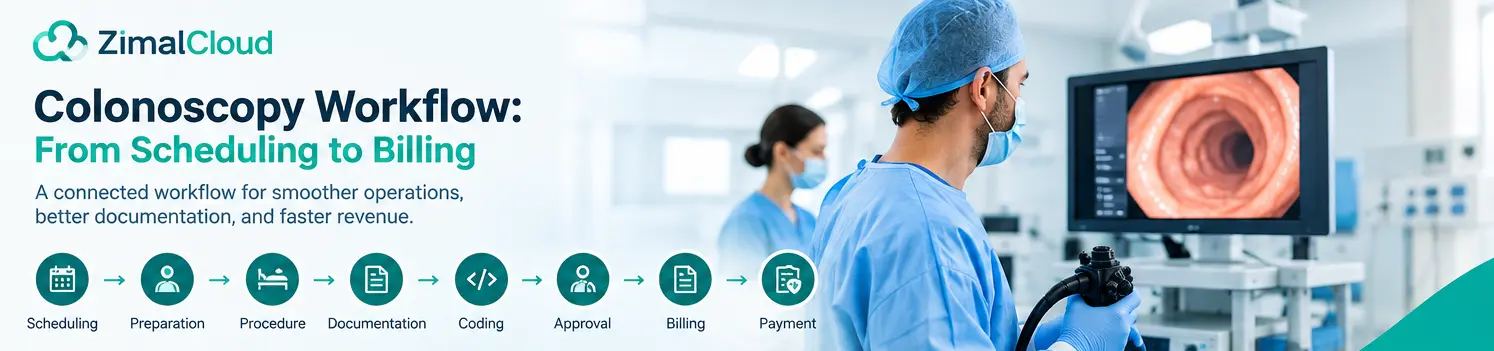
Table of contents
- Introduction
- What Is a Colonoscopy Workflow?
- 1. Colonoscopy Scheduling
- Why scheduling matters
- 2. Insurance Verification and Eligibility
- 3. Colonoscopy Preparation
- 4. Patient Reminders
- 5. Pre-Procedure Review
- 6. Colonoscopy Procedure Documentation
- 7. Structured Findings
- 8. Automated Report Generation
- Automation should support—not replace—clinical review
- 9. CPT and ICD-10 Coding
- 10. Provider Review and Approval
- 11. Billing and Claim Preparation
- 12. Claim Submission
- 13. Payment and Revenue Cycle Tracking
- The complete flow
- Common Colonoscopy Workflow Problems
- 1. Multiple disconnected systems
- 2. Duplicate data entry
- 3. Manual report creation
- 4. Coding delays
- 5. Missing documentation
- 6. Poor visibility
- How Automation Can Improve the Colonoscopy Workflow
- What an Integrated Colonoscopy Platform Should Include
- Scheduling
- Procedure Management
- Reporting
- Coding
- Billing
- Patient Record
- The Future of Colonoscopy Workflow Automation
- Conclusion
Introduction
A colonoscopy is more than a clinical procedure. Behind every successful colonoscopy is a multi-step workflow that begins with patient scheduling and continues through preparation, procedure documentation, coding, claim submission, and payment.
When these steps are handled manually or across disconnected systems, GI practices can experience scheduling delays, incomplete documentation, coding errors, missed billing opportunities, and unnecessary administrative work.
A connected colonoscopy workflow can help practices coordinate each stage while keeping procedure information, clinical documentation, coding, and billing workflows organized around the same patient record.
In this guide, we explain the colonoscopy workflow from scheduling to billing and highlight opportunities to automate repetitive administrative tasks.
What Is a Colonoscopy Workflow?
A colonoscopy workflow is the complete process used by a GI practice to manage a colonoscopy from the initial appointment through final billing.
A typical workflow includes:
- Patient scheduling
- Registration and eligibility verification
- Pre-procedure preparation
- Patient reminders
- Procedure planning
- Colonoscopy documentation
- Findings and diagnosis capture
- CPT and ICD-10 coding
- Provider review and approval
- Claim preparation and submission
- Payment and claim tracking
Each step contributes to the overall efficiency and financial performance of the GI practice.
1. Colonoscopy Scheduling
The workflow begins when a colonoscopy is scheduled.
During scheduling, the practice may need to capture information such as:
- Patient demographics
- Referral information
- Reason for procedure
- Procedure type
- Preferred date and time
- Provider
- Facility or procedure room
- Insurance information
- Relevant clinical information
A structured scheduling process helps reduce duplicate data entry and ensures that important information follows the patient throughout the workflow.
Why scheduling matters
Poor scheduling workflows can result in:
- Appointment delays
- Duplicate entries
- Incomplete patient information
- Missed appointments
- Inefficient room utilization
- Additional administrative work
Connecting scheduling with the patient's clinical and procedure record can make the workflow more efficient.
2. Insurance Verification and Eligibility
Before the procedure, the practice typically needs to verify insurance eligibility and determine whether additional authorization or payer-specific requirements apply.
The billing or administrative team may review:
- Insurance coverage
- Eligibility
- Referral requirements
- Authorization requirements
- Patient responsibility
- Payer information
Handling these checks early can help reduce avoidable billing problems later.
Important: Coverage and authorization requirements vary by payer, plan, procedure, and patient circumstances. Practices should verify requirements with the applicable payer rather than relying on assumptions.
3. Colonoscopy Preparation
Patient preparation is an important part of the colonoscopy workflow.
Patients may need instructions regarding:
- Diet restrictions
- Bowel preparation
- Medication considerations
- Arrival time
- Transportation requirements
- Procedure expectations
- Pre-procedure instructions
A digital workflow can help practices provide standardized instructions and reminders.
For example:
Scheduled → Preparation Instructions → Reminder → Preparation Confirmation → Procedure
This creates a clearer process for both staff and patients.
4. Patient Reminders
Missed appointments can affect provider schedules, procedure-room utilization, and practice revenue.
Automated reminders can help patients remember:
- Procedure date
- Arrival time
- Preparation instructions
- Required documentation
- Transportation arrangements
- Other practice-specific requirements
A reminder workflow can be triggered automatically based on the scheduled procedure.
5. Pre-Procedure Review
Before the colonoscopy begins, the clinical team may review the patient's relevant information and procedure plan.
Depending on the practice workflow, this can include:
- Medical history
- Indication for colonoscopy
- Previous procedures
- Medications
- Allergies
- Relevant test results
- Procedure plan
- Clinical risk information
Keeping this information available within the same patient record can reduce the need to search through multiple systems.
6. Colonoscopy Procedure Documentation
The colonoscopy itself generates important clinical information.
The provider may document:
- Procedure indication
- Extent of examination
- Bowel preparation quality
- Findings
- Polyps or lesions
- Biopsies
- Polypectomy
- Hemostasis
- Complications
- Specimens
- Recommendations
- Follow-up plan
Accurate procedure documentation is essential because the clinical record supports downstream coding, billing, quality reporting, and continuity of care.
7. Structured Findings
One major opportunity for workflow improvement is converting procedure findings into structured information.
Instead of relying entirely on free-text documentation, a structured workflow can capture relevant findings in predefined fields.
For example:
Finding → Location → Size → Intervention → Specimen → Diagnosis
Structured data can make it easier to review the procedure and prepare the information needed for coding.
8. Automated Report Generation
Traditional GI workflows may require providers or staff to enter the same information multiple times.
For example:
Procedure → Findings → Report → Coding → Billing
When these processes are disconnected, the same information may need to be manually transferred between systems.
An integrated workflow can use documented procedure information to help populate the procedure report.
This can reduce repetitive data entry while allowing the provider to review and modify the report before finalization.
Automation should support—not replace—clinical review
Automation can assist with repetitive documentation and coding workflows, but the final clinical record and codes should be reviewed and approved by appropriately authorized healthcare professionals.
9. CPT and ICD-10 Coding
After documentation is completed, the procedure needs to be translated into appropriate billing codes.
For colonoscopy, coding can depend on factors such as:
- Procedure performed
- Findings
- Interventions
- Biopsy or removal techniques
- Diagnoses
- Payer requirements
- Documentation supporting the billed services
A workflow can assist with identifying potential CPT and ICD-10 codes based on documented information.
However, automated suggestions should not be treated as final coding decisions. Appropriate coding requires qualified review and adherence to current coding guidelines and payer requirements.
10. Provider Review and Approval
Before the procedure report and associated coding information move forward, provider review is an important control point.
A streamlined workflow can provide a review sequence such as:
Draft Report → Provider Review → Corrections → Approval → Final Report
This helps ensure that the final documentation reflects the actual procedure performed.
A completed report can then become part of the patient's permanent medical record.
11. Billing and Claim Preparation
Once documentation and coding have been reviewed, the workflow moves toward billing.
The billing process may include:
- Confirming procedure documentation
- Reviewing CPT codes
- Reviewing diagnosis codes
- Checking required claim information
- Preparing the claim
- Submitting the claim
- Tracking claim status
Connecting clinical documentation with billing workflows can reduce manual handoffs between clinical and billing teams.
12. Claim Submission
The claim is submitted to the appropriate payer after the required information has been reviewed.
Common problems that can affect claims include:
- Missing information
- Incorrect patient information
- Coding inconsistencies
- Insufficient documentation
- Eligibility problems
- Authorization issues
- Payer-specific requirements
A connected workflow can help identify potential issues earlier in the process.
13. Payment and Revenue Cycle Tracking
The workflow does not end when a claim is submitted.
The practice may need to monitor:
- Claim acceptance
- Claim status
- Rejections
- Denials
- Payments
- Patient responsibility
- Outstanding balances
A complete workflow connects the clinical event with the financial process.
The complete flow
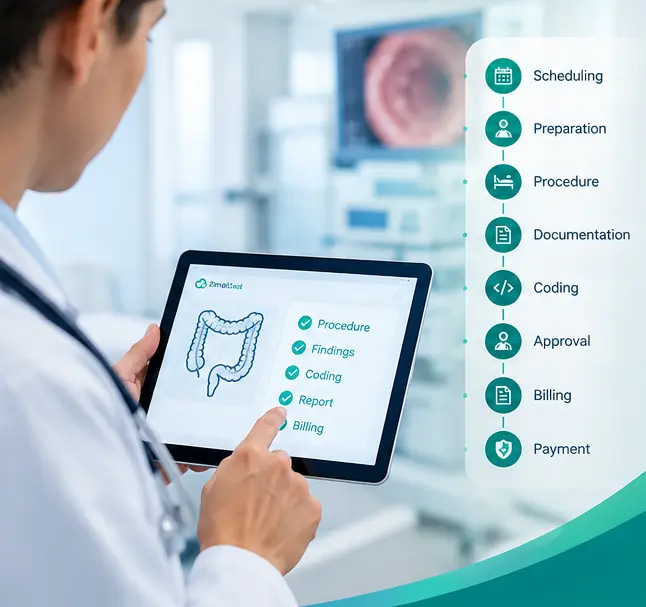
Schedule → Prepare → Perform → Document → Code → Approve → Bill → Track → Collect
This provides a more complete view of the colonoscopy revenue cycle.
Common Colonoscopy Workflow Problems
GI practices may encounter several operational challenges.
1. Multiple disconnected systems
When scheduling, clinical documentation, coding, and billing operate in different applications, staff may repeatedly transfer information.
2. Duplicate data entry
Entering the same patient or procedure information multiple times increases administrative workload.
3. Manual report creation
Providers may spend unnecessary time transferring information from procedure notes into formal reports.
4. Coding delays
When coding depends on manually reviewing documents, the process can become slower.
5. Missing documentation
Incomplete procedure documentation can create downstream problems for coding and billing.
6. Poor visibility
When workflow information is distributed across different systems, practice managers may have difficulty seeing where a procedure currently stands.
How Automation Can Improve the Colonoscopy Workflow
Healthcare automation can help connect repetitive workflow steps.
Instead of:
Scheduling System → Procedure System → Documentation → Coding → Billing System
an integrated platform can provide a connected workflow:
Patient → Appointment → Procedure → Structured Findings → Report → CPT/ICD → Billing
Potential benefits include:
- Less duplicate data entry
- Faster documentation
- More consistent workflows
- Better visibility
- Easier provider review
- Reduced administrative workload
- Faster movement from procedure to billing
- Better continuity of patient information
The goal is not simply to automate individual tasks. The bigger opportunity is to connect the entire workflow.
What an Integrated Colonoscopy Platform Should Include
When evaluating GI workflow software, practices may want to look for capabilities such as:
Scheduling
- Appointment management
- Procedure scheduling
- Patient registration
- Reminder workflows
Procedure Management
- Procedure planning
- Structured findings
- Procedure documentation
- Quality-related data capture
Reporting
- Automated report population
- Provider review
- Digital approval
- Finalized procedure reports
Coding
- CPT assistance
- ICD-10 assistance
- Procedure-specific coding workflows
- Coding review
Billing
- Billing-ready documentation
- Claim preparation
- Billing handoff
- Revenue-cycle visibility
Patient Record
Most importantly, these components should ideally work from a shared patient record rather than forcing staff to move information between disconnected applications.
The Future of Colonoscopy Workflow Automation
GI practices are increasingly looking for ways to reduce administrative work without compromising clinical oversight.
The future of colonoscopy workflow automation is likely to focus on connecting:
Scheduling + Preparation + Procedure + Documentation + Coding + Billing
AI and automation can assist with repetitive tasks such as report population, information organization, and coding suggestions, while clinicians remain responsible for reviewing and approving clinical documentation and coding decisions.
The result can be a workflow where information captured during the procedure continues through the rest of the process instead of being repeatedly recreated.
Conclusion
A colonoscopy workflow involves much more than performing the procedure.
From scheduling and patient preparation to procedure documentation, coding, claim submission, and payment, every step affects the efficiency of a GI practice.
Disconnected workflows can create duplicate work and delays. An integrated colonoscopy workflow can connect these stages around the same patient record, helping practices reduce repetitive administrative tasks and improve visibility across the procedure-to-billing lifecycle.
For GI practices looking to modernize operations, the key question is not simply:
“Can our software document a colonoscopy?”
It is:
“Can our workflow connect the colonoscopy from scheduling all the way to billing?”
FAQ
Frequently asked questions
What is a colonoscopy workflow?
A colonoscopy workflow is the complete process used to manage a colonoscopy, from patient scheduling and preparation through procedure documentation, coding, claim submission, and payment tracking.
What are the main steps in a colonoscopy workflow?
The main steps typically include scheduling, registration and eligibility verification, patient preparation, reminders, pre-procedure review, colonoscopy documentation, findings capture, CPT and ICD-10 coding, provider approval, claim preparation, claim submission, and payment or claim tracking.
Why is colonoscopy scheduling important?
Effective colonoscopy scheduling helps organize appointments, providers, procedure rooms, patient information, and preparation requirements while reducing scheduling delays, duplicate data entry, and missed appointments.
What information should be documented during a colonoscopy?
Colonoscopy documentation may include the procedure indication, extent of examination, bowel preparation quality, findings, polyps or lesions, biopsies or other interventions, specimens, complications, recommendations, and follow-up plans.
How does colonoscopy documentation affect billing?
Complete and accurate procedure documentation provides important clinical information needed to support appropriate coding and billing. Documentation should accurately reflect the procedure performed, findings, interventions, and diagnoses.
What CPT and ICD-10 codes are used for colonoscopy?
Colonoscopy CPT and ICD-10 coding depends on the procedure performed, findings, interventions, diagnoses, documentation, payer requirements, and other applicable coding rules. Appropriate codes should be selected and reviewed by qualified coding professionals.
Can colonoscopy reporting be automated?
Healthcare software can automate or assist with repetitive parts of colonoscopy reporting, such as populating structured information from documented procedure findings. The provider should review and approve the final clinical report.
How can automation improve a GI colonoscopy workflow?
Automation can help connect scheduling, preparation, procedure documentation, structured findings, report generation, coding assistance, provider approval, and billing workflows. This can reduce duplicate data entry and improve visibility across the procedure-to-billing process.
What should GI practices look for in colonoscopy workflow software?
GI practices may look for software that supports scheduling, patient preparation, procedure planning, structured findings, documentation, provider review, CPT and ICD-10 coding workflows, billing handoff, and a shared patient record.
Why connect colonoscopy documentation and billing workflows?
Connecting colonoscopy documentation and billing workflows can reduce manual information transfer, minimize duplicate data entry, improve workflow visibility, and help move completed procedure information more efficiently toward coding and billing.