How to Build a GI Procedure Follow-Up Workflow after Biopsy
Learn how GI practices can track biopsy results, manage pathology reports, communicate findings to patients, and organize follow-up care using a structured workflow and gastroenterology EHR software.
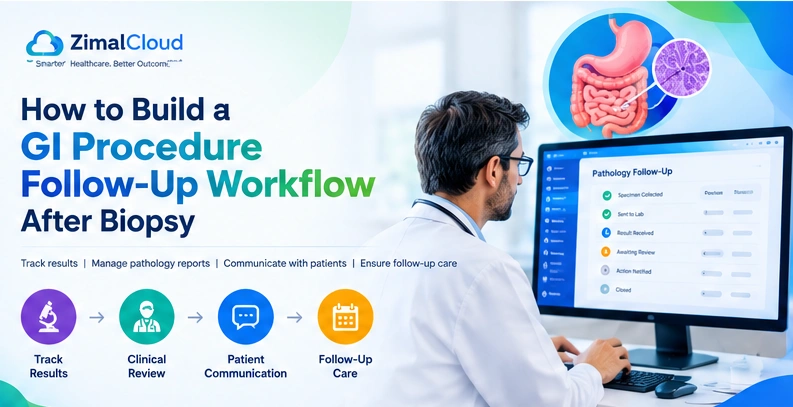
Table of contents
- Why Is a GI Biopsy Follow-Up Workflow Important?
- What Is a GI Biopsy Follow-Up Workflow?
- Step 1: Document the Biopsy and Verify the Specimen
- Step 2: Assign Ownership of Every Pending Result
- Step 3: Create a Pathology Results Tracking System
- How should delayed results be handled?
- Step 4: Establish a Clinical Review Process
- Step 5: Communicate Results to Patients
- What if the patient cannot be reached?
- Step 6: Coordinate With Referring Providers
- Step 7: Connect Results to Follow-Up Appointments and Actions
- Step 8: Use Gastroenterology EHR Software to Support the Process
- Procedure and specimen documentation
- Results and task tracking
- Clinical review documentation
- Communication records
- Recall and follow-up management
- Access controls and auditability
- Step 9: Measure and Improve Follow-Up Performance
- Common GI Biopsy Follow-Up Mistakes to Avoid
- Conclusion: Build a Reliable GI Biopsy Follow-Up Process
A gastrointestinal biopsy does not end when a tissue sample is collected. Gastroenterology practices must also ensure that pathology results are received, reviewed by the appropriate clinician, communicated to the patient, and connected to any recommended next steps.
Without a consistent process, a practice may struggle to identify pending results, assign responsibility, document communication, or confirm that recommended follow-up has been completed.
A structured GI biopsy follow-up workflow helps practices manage these tasks from specimen collection through clinical follow-up. It gives physicians and staff a clear process for tracking outstanding results, escalating unresolved cases, and documenting decisions.
This guide explains how to build a practical workflow for U.S. gastroenterology practices, which responsibilities to define, what information to track, and how electronic health record (EHR) software can support the process.
Why Is a GI Biopsy Follow-Up Workflow Important?
During procedures such as colonoscopy and upper gastrointestinal endoscopy, clinicians may collect tissue samples for pathological examination. The findings may influence a patient's diagnosis, treatment, additional testing, or future surveillance.
The American Society for Gastrointestinal Endoscopy (ASGE) and American College of Gastroenterology (ACG) identify communication of endoscopic findings, pathology results, and follow-up recommendations to patients and appropriate providers as important quality indicators. Their guidance also emphasizes documenting specimen verification and the plan for pathology follow-up.
Review the ASGE/ACG quality indicators for GI endoscopic procedures.
A defined workflow helps practices:
- Identify pathology reports that have not arrived.
- Assign responsibility for reviewing results.
- Document clinical decisions and recommended next steps.
- Communicate relevant findings to patients.
- Coordinate with referring physicians when appropriate.
- Track follow-up appointments and unresolved actions.
- Review operational performance and identify workflow gaps.
The objective is not simply to record that a report arrived. It is to establish a reliable process for taking the appropriate action after the result becomes available.
What Is a GI Biopsy Follow-Up Workflow?
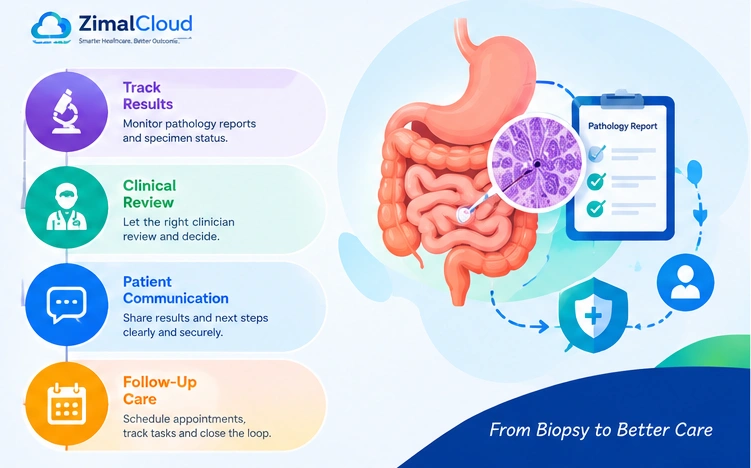
A GI biopsy follow-up workflow is the documented process used to manage a biopsy from collection and laboratory submission through pathology review, patient communication, and any required follow-up.
A typical workflow looks like this:
Biopsy collected → Specimen verified and submitted → Pathology result tracked → Clinician reviews result → Patient and relevant providers informed → Follow-up action completed or appropriately documented
Each stage should have a responsible person, a clear status, and a defined next step.
For example, a pathology report may be received but still awaiting clinician review. Another report may have been reviewed, while the patient has not yet been reached. These are different situations and should not be treated as the same completed task.
A good process makes these distinctions visible.
Step 1: Document the Biopsy and Verify the Specimen
The follow-up process begins during the procedure.
The clinical team should document the biopsy and verify that the specimen is correctly identified and handled according to the practice's procedures and laboratory requirements.
Relevant documentation may include:
- Patient identifiers.
- Procedure date and type.
- Specimen site and identifying details.
- Ordering or responsible clinician.
- Laboratory destination and submission status.
- Procedure findings and relevant clinical context.
- Initial patient instructions.
- The anticipated process for communicating pathology results.
Accurate identification is essential to matching a laboratory report to the correct patient and procedure.
Practical recommendation: Use a standardized documentation checklist for specimen verification, submission, and assignment of follow-up responsibility.
Step 2: Assign Ownership of Every Pending Result
A biopsy follow-up process needs clear accountability. Every case should have an identified clinician responsible for reviewing the result and a defined process for staff to monitor its progress.
Depending on the practice's structure, a designated nurse, clinical support team, or results-management staff member may help monitor outstanding reports and route them to the appropriate clinician. Clinical interpretation and treatment decisions should remain with an appropriately qualified clinician.
Define who is responsible for:
- Confirming that the specimen was submitted.
- Checking for outstanding pathology reports.
- Investigating delayed or missing reports.
- Routing received reports for clinical review.
- Recording the clinician's decision.
- Coordinating patient and provider communication.
- Tracking any remaining follow-up tasks.
A written responsibility matrix can prevent confusion when staff are absent, responsibilities change, or multiple clinicians participate in a patient's care.
For each stage, specify a primary owner, a backup process, and an escalation route.
Step 3: Create a Pathology Results Tracking System
Pathology results tracking helps the practice identify which cases are waiting for laboratory results, which require clinician review, and which still need action.
A centralized electronic queue or documented tracking register can make these cases easier to monitor.
Consider including the following fields:
Tracking field | Why it matters |
| Patient and procedure identifiers | Connect the result to the correct record |
| Biopsy and submission dates | Establish the timeline |
| Laboratory status | Identify reports that remain outstanding |
| Responsible clinician | Clarify review ownership |
| Review status | Show whether clinical assessment is complete |
| Communication status | Record patient and provider notifications |
| Recommended next step | Connect the result to the care plan |
| Task owner and due date | Support accountability |
| Closure status | Confirm that required actions are resolved |
Use consistent statuses, such as:
- Pending: The pathology report has not been received.
- Received: The report is available but has not completed clinical review.
- Under review: The responsible clinician is assessing the result.
- Action required: A decision or follow-up task remains outstanding.
- Closed: Required actions have been completed or an appropriate disposition has been documented.
These labels are examples. Practices should adapt them to their staffing, clinical policies, and software capabilities.
How should delayed results be handled?
Establish expected turnaround times with the laboratory and define when an outstanding report must be investigated. Turnaround expectations can vary according to the specimen, laboratory, and clinical circumstances.
If a report is delayed beyond the established threshold, the assigned team member should investigate, document the outcome, and escalate the case when necessary.
Urgent clinical concerns require the practice's appropriate escalation procedure rather than waiting for a routine administrative reminder.
Step 4: Establish a Clinical Review Process
When a pathology report arrives, the designated clinician should review it in the context of the procedure findings, relevant medical history, and other available clinical information.
The workflow should distinguish between receipt of a result and completion of clinical review.
Following review, the clinician may determine that the patient needs treatment, additional testing, a follow-up consultation, surveillance, referral, or no further action at that time.
The specific decision depends on the patient's findings and circumstances.
A practical review process should capture:
- The date the report was reviewed.
- The responsible clinician.
- The clinical interpretation and documented decision.
- Any recommended action.
- The person responsible for coordinating the action.
- The communication and follow-up requirements.
The tracking system should not make clinical decisions automatically based on a generic result category or apply the same follow-up interval to every biopsy.
Step 5: Communicate Results to Patients
Patients should understand how they will receive biopsy results and what to expect after the procedure.
The practice can explain the communication process in its discharge instructions, including the expected method of contact and the appropriate way to reach the clinical team with questions.
Once the result has been reviewed, communication may take place through an approved channel, such as a secure patient portal, telephone call, letter, or follow-up appointment.
The communication should explain, as appropriate:
- The relevant findings in understandable language.
- What those findings mean for the patient's care.
- Whether treatment or additional testing is recommended.
- Whether another appointment or procedure is needed.
- How the patient can ask questions or obtain clarification.
Document the date, method, and outcome of the communication according to the practice's policies.
What if the patient cannot be reached?
A failed contact attempt should not automatically close the case.
The practice should document the attempt, follow its approved contact and escalation procedures, and continue tracking the case when further action is needed. The appropriate response may differ depending on the clinical significance of the result.
The ASGE/ACG guidance highlights timely communication of pathology findings and follow-up recommendations to patients and relevant providers as an important quality measure.
Step 6: Coordinate With Referring Providers
GI biopsy results may affect care delivered by a primary care physician or another specialist. When relevant, the gastroenterology practice should communicate the findings and recommendations to the appropriate providers through an authorized, secure channel.
A documented process should identify:
- Which providers need the information.
- What information and recommendations were shared.
- When and how the information was sent.
- Whether further coordination is required.
- Whether a communication attempt remains unresolved.
This step helps reduce gaps when a patient's care involves more than one clinical team.
Communication should follow applicable privacy requirements, the patient's circumstances, and the practice's policies.
Step 7: Connect Results to Follow-Up Appointments and Actions
After the clinician determines the next step, the workflow should convert that decision into an actionable task.
Depending on the documented plan, this may involve scheduling a consultation, coordinating treatment, arranging additional testing, or tracking a future surveillance recommendation.
A follow-up register can include the recommended action, responsible team member, target date, appointment status, and completion notes.
For surveillance or repeat procedures, use the clinician's documented recommendation and applicable clinical guidance rather than a generic interval.
A case should remain open while required actions are outstanding. If the clinician determines that no further action is needed, record that decision and close the case according to the practice's process.
For a broader view of how procedure scheduling, documentation, and follow-up fit together, see guide to Colonoscopy Workflow: From Scheduling to Billing.
Step 8: Use Gastroenterology EHR Software to Support the Process
A well-configured EHR can help a GI practice connect procedure documentation with results management and follow-up tasks. The exact capabilities depend on the software, its configuration, and any laboratory integrations.
Useful capabilities to evaluate include:
Procedure and specimen documentation
The system should allow staff to record procedure details and maintain a clear connection between the procedure and its associated documentation.
Results and task tracking
Look for a way to identify outstanding reports, assign review responsibility, and distinguish received results from unresolved follow-up actions.
Clinical review documentation
The record should support documenting the clinician's assessment, recommendations, and next steps.
Communication records
Staff should be able to document relevant patient and provider communication using the practice's approved workflow.
Recall and follow-up management
Where available, task lists and recall functions can help the practice track appointments, future surveillance, and outstanding clinical actions.
Access controls and auditability
Evaluate whether the system supports appropriate user permissions, access logging, and other security controls required by the practice's policies and applicable obligations.
Before choosing a solution, confirm which features are available, which require configuration, and whether a laboratory interface or another integration is needed.
Gastroenterology EHR and Endoscopy Report Software describes GI procedure documentation, structured findings, procedure reports, and scheduling-related workflows.
Step 9: Measure and Improve Follow-Up Performance
Once the workflow is established, practice managers can monitor operational measures to identify bottlenecks and unresolved cases.
Useful measures may include:
- Percentage of biopsy cases with documented follow-up plans.
- Number of pathology reports pending beyond the practice's expected turnaround time.
- Time between report receipt and clinician review.
- Percentage of results with documented patient communication.
- Number of cases with unresolved follow-up actions.
- Percentage of recommended appointments or surveillance tasks completed or appropriately tracked.
Define the calculation and reporting period for each measure before comparing performance over time.
For example, a practice might review the percentage of received pathology reports that have documented clinical review within its internally defined target period. This is an operational measure—not a substitute for a formal quality standard.
Review exceptions as well as averages. A good overall result can conceal a small number of cases that need urgent attention.
Use the findings to refine responsibilities, adjust task routing, improve staff training, and identify whether technology changes are necessary.
Common GI Biopsy Follow-Up Mistakes to Avoid
No clearly assigned owner: Identify who monitors pending results and who is responsible for clinical review.
Treating report receipt as completion: A received report may still need interpretation, communication, or further action.
Relying on memory alone: Use a consistent tracking process to identify unresolved cases.
Failing to document contact attempts: Record communication outcomes and follow the practice's escalation process when a patient cannot be reached.
Losing sight of future recommendations: Convert the clinician's documented plan into an appointment, recall, or other appropriate task.
Using generic follow-up intervals: Base clinical recommendations on individual findings and applicable guidance.
Assuming every EHR has the same capabilities: Verify specific tracking, integration, reminder, and reporting features before implementation.
Conclusion: Build a Reliable GI Biopsy Follow-Up Process
A reliable GI biopsy follow-up workflow connects specimen collection, pathology results tracking, clinician review, patient communication, and the completion of recommended actions.
For gastroenterology practices, the key is to define responsibility at every stage, make unresolved cases visible, document clinical decisions, and review the process regularly.
EHR software can support this work when its capabilities match the practice's requirements.
Let’s see what your GI program is missing
Live procedure workflows built around endoscopy, accurate codes, and a ready-to-send PDF.
- Calendar Play → signed GI procedure.
- CPT auto-rules: indications → actions.
- Capture and annotate scope frames.
- Template Colonoscopy, EGD, Flex Sig.
- Findings, withdrawal time, cecal.
- GI catalogs and coding rules config.
See features and workflows on Gastroenterology EHR Software.
This launch offer has ended.
FAQ
Frequently asked questions
What is a GI biopsy follow-up workflow?
It is the process a gastroenterology practice uses to track a biopsy from specimen collection and laboratory submission through pathology review, patient communication, and any recommended next steps.
Who should be responsible for tracking biopsy results?
The practice should designate a responsible clinician for clinical review and define which staff members monitor pending reports, route results, and coordinate follow-up. Responsibilities should be documented in the practice's procedures.
How can a GI practice track pending pathology results?
A practice can use an EHR work queue, a dedicated results register, or another documented tracking system. It should identify outstanding reports, review status, responsible personnel, and unresolved actions.
What should happen after a biopsy result is received?
The designated clinician should review the report, determine the appropriate next step, document the decision, and ensure that the patient and relevant providers receive the necessary information.
How long should a practice wait for pathology results?
There is no single appropriate turnaround time for every biopsy. Practices should establish expectations with their laboratory partners, account for the type of specimen and clinical circumstances, and define a process for investigating delays and escalating urgent concerns.
Can gastroenterology EHR software help manage biopsy follow-up?
Depending on its capabilities, an EHR may support procedure documentation, results tracking, task assignment, clinical review records, communication documentation, and future follow-up tasks. Practices should confirm specific functionality and integration requirements with the vendor.