Practice management for the whole day

Scheduling, registration, check-in, and claims-ready operations

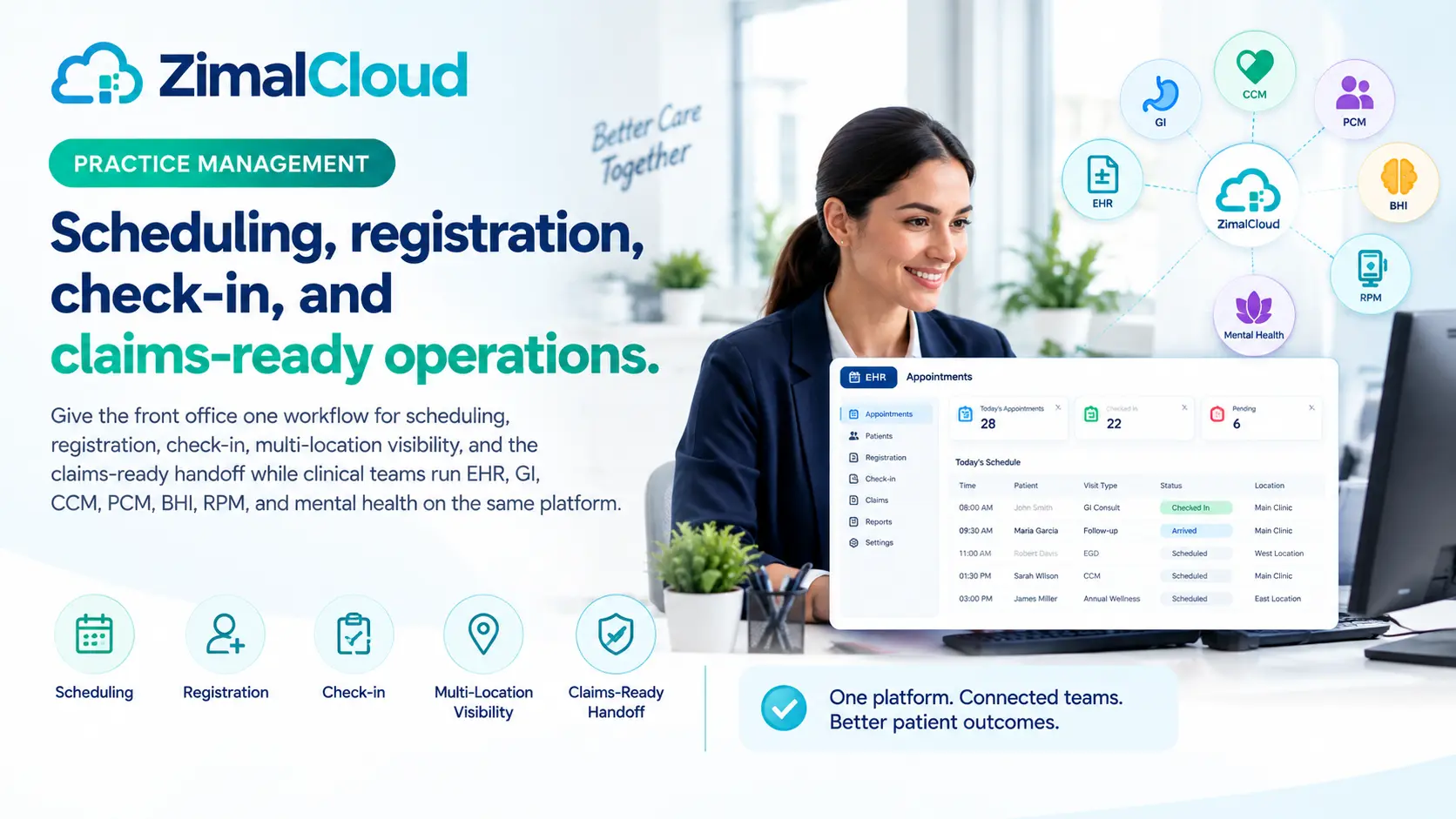
Give the front office one workflow for scheduling, registration, check-in, multi-location visibility, and the claims-ready handoff while clinical teams run EHR, GI, CCM, PCM, BHI, RPM, and mental health on the same platform.

  • Multi-location scheduling and visit-type control
  • Registration and check-in tied to the patient record
  • Claims-ready operational path beside clinical modules
Front-desk team managing scheduling, registration, check-in, and claims-ready practice operations
Schedule live Locations and providers aligned
Check-in clear Front-desk status visible
Why practices choose ZimalCloud PM

Front-office operations connected to clinical care

ZimalCloud PM connects scheduling, registration, check-in, multi-location visibility, and the claims-ready handoff to the same platform used for EHR, GI, CCM, PCM, BHI, RPM, and mental health. Front-office staff can run the day without recreating patient, payer, and visit context across disconnected tools.

Why choose us

The front desk sets the pace for every visit. ZimalCloud PM keeps scheduling, registration, check-in, and the claims-ready handoff connected to the same record clinicians use for care.

  • Provider, location, and visit-type scheduling
  • Registration and check-in without duplicate patient entry
  • Same platform as EHR, GI, CCM, PCM, BHI, RPM, and MH
Better than disconnected front-office tools

Separate calendars, intake forms, and billing handoffs force staff to reconcile the day by hand. ZimalCloud PM gives operations, clinical teams, and billing review a shared starting point.

  • Scheduling context flows into the visit
  • Patient and payer details captured once
  • Operational data stays ready for claims and reporting

Outcomes your team can feel

When staff can see the schedule, arrivals, outstanding tasks, and visit handoff in one place, patient flow becomes easier to manage across locations.

  • Less rework at registration and check-in
  • Clearer visibility across sites and providers
  • A cleaner path from completed visit to claims review
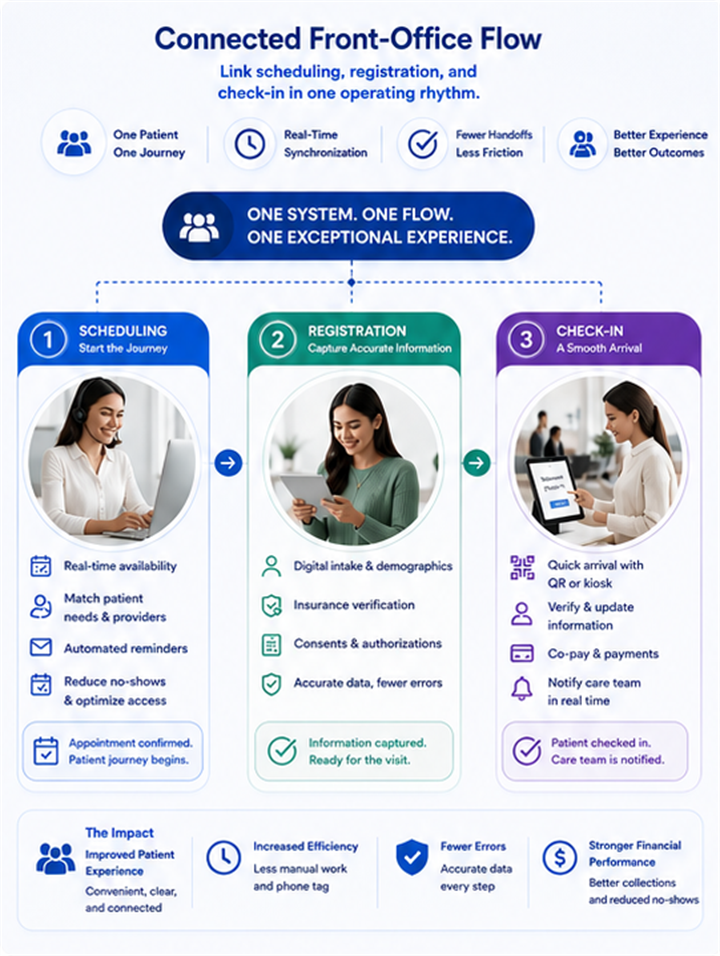
Practice management workflow connecting scheduling, registration, check-in, clinical modules, and claims-ready operations
What the product delivers today

Front-office flow connected to clinical and billing work

ZimalCloud PM gives your staff a practical operating layer for the day: book the right visit, register the patient, check them in, support multiple locations, and keep the visit ready for clinical documentation and claims review.

  • Scheduling and visit control Manage providers, locations, appointment types, recurring visits, and same-day changes from a shared calendar view.
  • Registration and check-in Capture demographics, payer details, consents, arrival status, and front-desk tasks before the clinical handoff.
  • Claims-ready handoff Keep the operational path ready for charge and claims review while clinical modules handle the encounter or care program.
AIDA path - how the front office runs

Schedule, prepare, check in, hand off, review

A repeatable operating rhythm for front desks that support multiple providers, locations, and clinical service lines.

  1. STEP 01

    Schedule the visit

    Book the right provider, location, visit type, and resource with shared calendar visibility.

  2. STEP 02

    Prepare registration

    Capture demographics, payer details, consent, and intake needs before the patient reaches the desk.

  3. STEP 03

    Check in on arrival

    Update arrival status, verify open tasks, and keep the front desk aligned on wait status.

  4. STEP 04

    Hand off to care

    Move the visit into EHR, GI, or care-management workflows without recreating the patient context.

  5. STEP 05

    Support claims review

    Keep visit, payer, and operational details ready for the revenue-cycle path your practice uses.

Built for daily practice operations

The operating layer for scheduling, registration, and patient flow

Support the front office while keeping clinical modules, care programs, and claims-ready handoffs connected to the same platform.

Appointment scheduling

Manage provider calendars, locations, visit types, recurring visits, and same-day changes.

Registration workflows

Capture demographics, payer details, consents, and intake data in structured front-desk flows.

Check-in visibility

Track arrival status, outstanding tasks, and patient movement through the visit.

Multi-location operations

Give shared staff visibility across sites, providers, and appointment queues.

Claims-ready handoff

Carry visit and payer context toward charge capture and claims review without duplicate entry.

Clinical module connection

Work beside EHR, GI, CCM, PCM, BHI, RPM, and MH from the same patient record.
Package inclusions

Included with the PM price

Per provider / month or year. The PM subscription covers the live features below.

Area What the practice gets
Access & onboarding Login; practice registration wizard; user profile
Practice administration Practice CRUD; assign services/providers; 33-step Practice Setup (8 phases); provider & clinician masters; groups / users / permissions (RBAC)
Dashboards Role-based home; provider dashboard (today’s appointments, waiting, alerts)
Scheduling Calendar (day/week); book; list; timeline; check-in; doctor queue; visit lifecycle with specialty actions (e.g. GI/MH)
Patient registry Search/create/edit; Patient Console (multi-service hub); Patient Chart (primary PM billing workspace)
Encounters Encounter list/create as PM clinical bridge into billing
Eligibility Eligibility search; Load Saved / Re-verify; Medicare Part A/B/C/D, QMB, hospice detail (where data available)
Coding review Coding Ready / Mark Review; ICD/CPT edit handoff
Claims Practice-wide claim grid; Patient Chart claims editor; CMS-1500 / HCFA print
Submission Batch build, lock, electronic 837 via gateway; batch detail
Clearinghouse files Import/download clearinghouse files (e.g. Office Ally path)
Claim status EDI 277 claim status follow-up
ERA & payments ERA list/detail/post; EOB/insurance + patient payment posting; chart payment history
Invoices Invoice search, send, bulk send; patient invoice tab
Statement settings Practice setup statement configuration (live settings API)
Credentialing Credentialing task grid + practice-setup credentialing steps
Billing reports Reports hub with live billing/SQL reports (aging, denials, and related RCM reports)
Communications Inbox / message log / electronic fax UI; SMS/email appointment reminders when configured
Telehealth (advanced) Available and complimentary — waiting room, admit, consent, audio-only, clinical note, WebRTC
Data migration Assisted migration of agreed starter data at go-live
Customer support 9:00–17:00 Monday–Friday working days
Add-ons & usage

Not included in the base PM provider price

Telehealth is complimentary. The items below are separate from the PM per-provider price.

Item Charge
Telehealth Available + complimentary (advanced features included)
E-prescription (eRx) $40 / month (add-on)
Twilio SMS As per use (usage-based; appointment reminders when configured)
Fax As per use (usage-based)
Clearinghouse (e.g. Office Ally) Practice brings / configures credentials — platform supports SFTP / 837 gateway path

E-prescription is a fixed $40/month add-on. Twilio SMS and fax are billed as per use. Clearinghouse fees are typically charged by the clearinghouse vendor separately.

Revenue cycle stages

Sales view of the PM revenue cycle

How eligibility through follow-up maps to day-to-day billing work.

Stage Capability Practice benefit
Eligibility Load Saved / Re-verify · Medicare detail Verify coverage before you bill
Coding Coding Ready · Mark Review · ICD/CPT edit Cleaner clinician → coder → biller handoff
Claim build Claim workspace · Chart claims · HCFA / CMS-1500 Build claims from the patient financial view
Submit Submission batches · lock · 837 gateway Batch and send without leaving the platform
Follow-up Claim Status (277) · ERA · Payment · Invoice · reports Track payer response and post remits in one place
Telehealth

Complimentary advanced telehealth with PM

Video visits start from appointments when the practice uses Zimal Telehealth — no extra platform fee.

Capability Status
Provider-started video / audio (Zimal Telehealth) Available
Guest join without account (secure invite) Available
Invite via SMS / email join link Available
Waiting room + provider admit Available
Patient consent capture Available
Mic / camera controls; audio-only mode Available
Call duration; clinical note on end Available
WebRTC + SignalR real-time 1:1 session Available
Care programs

How PM connects to care programs

Clinical modules are separate SKUs; PM is the shared claims rail and scheduling backbone.

Program Relationship to PM
CCM / PCM / BHI / MH / GI / RPM Separate clinical SKUs on the same patient console; claim submission uses the PM claims path
AWV / ACP Care-path modules that can run with PM + care programs (e.g. AWV included with CCM when that SKU is active)
Admin clinical catalogs /admin is clinical program admin — separate from PM practice setup

Keep clear: real-time payer 270 inquiry UI is not the default live eligibility story; dedicated statement generate/print/send is not complete; patient portal is not included as a live PM feature; care-program minutes/codes → claim lines are a manual/bridge path today.

Designed around your practice

A strong fit for practices that need smoother front-office operations

Independent practices, multi-specialty groups, and multi-location clinics that want front-office operations connected to clinical modules and claims workflow.

Independent practices Multi-specialty groups Multi-location clinics Teams adding EHR or GI
Ready to connect the front office?

Start Practice Management (PM) at $250 with launch discounts

Practice Management (PM) list price is $250/month. Lock in 20% off monthly · 40% off annual — live workflows ready for your practice mix.

  • Scheduling, registration, and claims-ready front-office ops
  • Multi-location visibility for providers, staff, and patient flow
  • Front-office workflows connected to EHR, GI, and care programs
20% / 40% launch savings Code LAUNCH50
Offer ends in Code LAUNCH50 ยท 20% off monthly · 40% off annual

This launch offer has ended.

Monthly
$250 $200
/mo
Annual
$3,000 $1,800
/yr

FAQ

Frequently asked questions

Does ZimalCloud have Practice Management?

Yes. PM is live for practice setup, scheduling, patient registry/chart, eligibility and coding review, claims (CMS-1500), 837 submission batches, clearinghouse files, ERA/payment posting, invoices, credentialing, and billing reports — and it is the claims path used by care programs on the same patient hub.

What does Practice Management cost?

Actual / list is $250 per provider per month. Through December 8, 2026: 20% off monthly ($200/provider/mo) or 40% off yearly ($1,800/provider/year). After Dec 8, 2026: $250/provider/mo, or annual 15% off ($2,550/provider/year). Telehealth is complimentary. E-prescription is $40/month. Twilio SMS and fax are as per use.

Is PM priced per patient or per provider?

Per provider, billed per month or per year. It is not a per-patient PM fee.

Is PM required to run CCM or other programs?

Care programs can be discussed as add-ons, but claim submission / clearinghouse upload uses the Practice Management claims path. Most practices run PM as the billing backbone with programs on the same hub.

Does PM include care-management clinical modules?

No. CCM, PCM, RPM, BHI, MH, and GI are separate product SKUs. PM provides scheduling, RCM, and the shared claims rail.

Is telehealth available?

Yes — available with current advanced features and complimentary on the platform.

What clearinghouse do you support?

The platform supports electronic 837 submission and clearinghouse file workflows (including Office Ally / SFTP gateway configuration). Practices configure their clearinghouse credentials.

What do e-prescription, SMS, and fax cost?

E-prescription is $40/month. Twilio SMS and fax are billed as per use (usage-based), separate from the PM per-provider price.

What support do we get?

Customer support 9:00–17:00, Monday–Friday (working days), plus go-live data migration of agreed starter data.