What Is Practice Management Software? A Complete Guide for Medical Practices
Practice Management Software helps medical practices manage the administrative and financial side of healthcare. From patient registration and appointment scheduling to insurance verification, claims, payments, and reporting, PMS connects essential workflows in one system. Learn how practice management software works, its key features, benefits, and what to consider when choosing a solution.
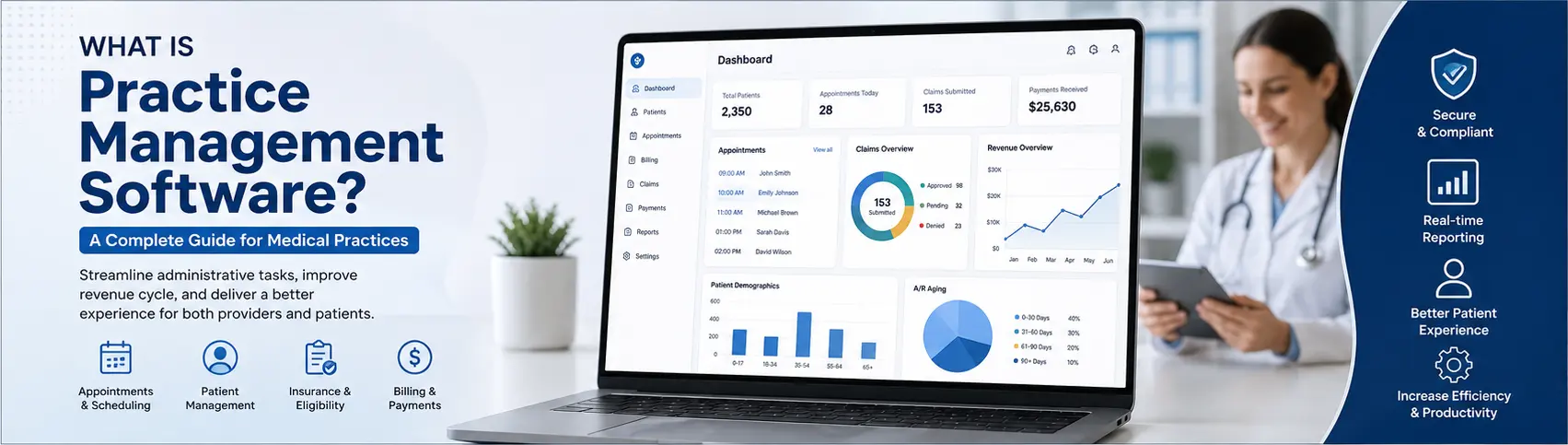
Table of contents
- Introduction
- What Is Practice Management Software?
- How Does Practice Management Software Work?
- Key Features of Practice Management Software
- 1. Patient Registration
- 2. Appointment Scheduling
- 3. Insurance Eligibility Verification
- 4. Medical Billing
- 5. Claims Management
- 6. Payment Posting and Accounts Receivable
- 7. Patient Billing and Statements
- 8. Reporting and Analytics
- Practice Management Software vs. EHR
- Benefits of Practice Management Software
- Improved Administrative Efficiency
- Fewer Billing Errors
- Faster Claims Processing
- Better Revenue Cycle Management
- Improved Patient Experience
- Better Practice Visibility
- Who Uses Practice Management Software?
- What Should You Look for in Practice Management Software?
- Ease of Use
- Billing and Claims Capabilities
- EHR Integration
- Clearinghouse Integration
- Reporting
- Security and Compliance
- Scalability
- Patient Engagement
- Practice Management Software for Specialty Practices
- Is Practice Management Software Worth It?
- Final Thoughts
Introduction
Running a medical practice involves much more than providing quality patient care. Healthcare providers and their staff must manage appointments, patient information, insurance eligibility, claims, payments, billing, documentation, and administrative tasks every day.
As practices grow, managing these activities manually can become time-consuming and error-prone. Practice Management Software (PMS) helps medical practices organize and automate their administrative and financial workflows from a centralized system.
Whether you operate a small physician office, specialty clinic, multi-provider practice, or healthcare organization, practice management software can improve efficiency, reduce administrative work, and support a smoother patient experience.
What Is Practice Management Software?
Practice Management Software is a healthcare technology solution designed to manage the administrative, operational, and financial activities of a medical practice.
Unlike an Electronic Health Record (EHR), which primarily focuses on clinical documentation and patient medical records, practice management software focuses on the business and administrative side of healthcare.
A typical practice management system can help practices manage:
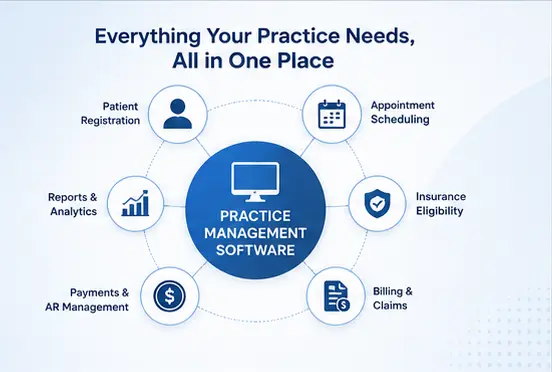
- Patient registration
- Appointment scheduling
- Provider calendars
- Insurance information
- Eligibility verification
- Medical billing
- Claims submission
- Payment posting
- Accounts receivable
- Patient statements
- Reporting and analytics
- Staff and practice workflows
Many modern platforms integrate practice management with EHR/EMR systems so clinical and administrative information can move efficiently between workflows.
How Does Practice Management Software Work?
A practice management system connects several administrative processes into a single workflow.
A typical process may look like:
Patient Registration → Appointment → Eligibility Verification → Encounter → Charge Capture → Claim Submission → Insurance Response → Payment Posting → Patient Billing → Reporting
This connected workflow reduces the need for staff to enter the same information into multiple systems.
For example, when a patient schedules an appointment, the system can store the patient's demographic and insurance information. Staff can then verify eligibility, capture charges after the encounter, submit the claim, record payments, and track outstanding balances.
Key Features of Practice Management Software
1. Patient Registration
PMS allows staff to create and maintain patient profiles containing information such as:
- Patient demographics
- Contact information
- Insurance details
- Guarantor information
- Emergency contacts
- Communication preferences
Digital registration can reduce paperwork and help keep patient information organized.
2. Appointment Scheduling
Scheduling is one of the most important functions of practice management software.
Features may include:
- Provider calendars
- Appointment types
- Availability management
- Recurring appointments
- Appointment confirmations
- Cancellation tracking
- Rescheduling
- Waitlists
- Multi-location scheduling
Some systems also integrate SMS, email, or automated reminders to reduce missed appointments.
3. Insurance Eligibility Verification
Before providing services, practices need to determine whether a patient's insurance is active and whether specific services may require authorization.
Practice management systems can support eligibility workflows by helping staff verify:
- Coverage status
- Insurance plan
- Patient responsibility
- Deductible information
- Copay and coinsurance
- Authorization requirements
Automating eligibility verification can help identify insurance problems before the patient's claim is submitted.
4. Medical Billing
Medical billing is a core component of practice management.
The software can help staff manage:
- CPT codes
- HCPCS codes
- ICD-10 diagnosis codes
- Modifiers
- Charge entry
- Claim creation
- Claim validation
- Claim submission
- Payment posting
For specialty practices, configurable billing workflows can help accommodate specialty-specific services and coding requirements.
5. Claims Management
A PMS can help practices manage the complete claims lifecycle.
A typical claims workflow includes:
Charge Entry → Claim Creation → Claim Scrubbing → Submission → Payer Response → ERA → Payment Posting → Denial Management
Some platforms connect with clearinghouses to electronically submit claims to insurance payers.
6. Payment Posting and Accounts Receivable
After a payer processes a claim, payments and adjustments must be accurately recorded.
Practice management software can help staff manage:
- Insurance payments
- Patient payments
- Contractual adjustments
- Denials
- Outstanding balances
- Aging accounts receivable
- Refunds
A centralized financial dashboard can give administrators a clearer view of the practice's revenue cycle.
7. Patient Billing and Statements
Patients may have financial responsibility after insurance processes a claim.
PMS platforms can generate patient statements and help practices track:
- Outstanding balances
- Copayments
- Deductibles
- Coinsurance
- Previous balances
- Payment history
Some systems also support online payment options and automated billing communications.
8. Reporting and Analytics
Practice administrators need visibility into financial and operational performance.
Common reports include:
- Revenue reports
- Charges and collections
- Accounts receivable aging
- Claim status
- Denial reports
- Payment reports
- Provider productivity
- Appointment statistics
- No-show rates
These reports can help practices identify bottlenecks and make better operational decisions.
Practice Management Software vs. EHR
Practice management software and EHR systems serve different primary purposes.
| Practice Management Software | EHR/EMR |
|---|---|
| Administrative operations | Clinical care |
| Appointment scheduling | Clinical documentation |
| Insurance management | Medical history |
| Billing and claims | Diagnoses |
| Payment posting | Medications |
| Accounts receivable | Clinical notes |
| Patient statements | Lab and diagnostic information |
| Financial reporting | Treatment documentation |
However, modern healthcare platforms often combine both systems.
For example, a practice may use an EHR for clinical documentation and a PMS for scheduling, billing, claims, and revenue cycle management.
Benefits of Practice Management Software
Improved Administrative Efficiency
Automating repetitive administrative tasks allows staff to spend less time on manual data entry and more time supporting patients and providers.
Fewer Billing Errors
Automated validation and structured billing workflows can help reduce errors in patient, insurance, and claim information.
Faster Claims Processing
Electronic claim workflows can reduce delays associated with paper-based processes and make claim status easier to monitor.
Better Revenue Cycle Management
By connecting charges, claims, payments, denials, and accounts receivable, practices can obtain better visibility into their revenue cycle.
Improved Patient Experience
Online scheduling, digital registration, reminders, statements, and payment options can make administrative interactions more convenient for patients.
Better Practice Visibility
Dashboards and reports help practice managers understand operational and financial performance.
Who Uses Practice Management Software?
Practice management systems can benefit many types of healthcare organizations, including:
- Primary care practices
- Gastroenterology practices
- Mental health practices
- Cardiology practices
- Orthopedic practices
- Dermatology practices
- Pediatrics
- Multi-specialty practices
- Behavioral health organizations
- Outpatient clinics
- Independent physician practices
The ideal system depends on the organization's size, specialty, workflow, billing requirements, and integration needs.
What Should You Look for in Practice Management Software?
When selecting a PMS, practices should evaluate more than just the feature list.
Ease of Use
Staff should be able to quickly learn the system and complete common tasks without unnecessary complexity.
Billing and Claims Capabilities
Evaluate support for claim creation, validation, electronic submission, payment posting, denials, and accounts receivable.
EHR Integration
If the practice already uses an EHR, confirm that the PMS can exchange relevant information with it.
Clearinghouse Integration
Electronic claims require reliable connectivity with clearinghouse services and payer networks.
Reporting
Look for customizable financial, operational, and productivity reports.
Security and Compliance
Healthcare software should implement appropriate security controls for protecting sensitive patient information and supporting applicable regulatory requirements.
Scalability
The platform should be able to support additional providers, locations, specialties, and patient volume as the practice grows.
Patient Engagement
Features such as online scheduling, digital registration, reminders, statements, and payment options can improve the overall patient experience.
Practice Management Software for Specialty Practices
Different medical specialties have different workflows.
For example, a gastroenterology practice may need workflows for procedures, facility information, professional billing, and specialty-specific coding.
A mental health practice may require scheduling, psychiatric evaluation workflows, psychotherapy billing, treatment plans, and behavioral health program management.
Therefore, practices should consider whether a PMS can be configured around their specific workflow rather than choosing a system based solely on general features.
Is Practice Management Software Worth It?
For many medical practices, practice management software can provide significant value by bringing scheduling, insurance, billing, claims, payments, and reporting into a connected workflow.
The greatest benefit often comes from reducing manual administrative work and improving visibility across the revenue cycle.
However, practices should evaluate the total cost of ownership, implementation requirements, integrations, staff training, and available support before selecting a platform.
Final Thoughts
Practice Management Software plays an important role in the modern medical practice. While EHR systems primarily support clinical care, PMS platforms help manage the administrative and financial processes that keep a practice operating efficiently.
From patient registration and scheduling to eligibility verification, claims, payments, and accounts receivable, a well-designed practice management system can connect critical workflows in one centralized platform.
As healthcare organizations continue to adopt digital workflows, choosing practice management software that is secure, scalable, easy to use, and compatible with existing healthcare systems can help practices improve operational efficiency while delivering a better experience for both providers and patients.