How Automation Can Reduce Administrative Work in Healthcare
Healthcare automation helps medical practices reduce administrative work by streamlining scheduling, insurance verification, medical billing, and patient communication. Discover how automated workflows, integrated software, and reporting tools can improve staff productivity, minimize errors, and simplify daily operations while maintaining data security and essential human oversight.
Table of contents
- How Automation Can Reduce Administrative Work in Healthcare
- What Is Healthcare Automation?
- Why Is Administrative Work a Challenge in Healthcare?
- 8 Ways Automation Can Reduce Administrative Work in Healthcare
- 1. Automate Appointment Scheduling and Reminders
- 2. Simplify Patient Registration and Data Entry
- 3. Streamline Insurance Eligibility Verification
- 4. Improve Medical Billing and Claims Processing
- 5. Reduce Payment Posting and Accounts Receivable Work
- 6. Streamline Documentation and Administrative Tasks
- 7. Improve Patient Communication and Follow-Ups
- 8. Automate Reporting and Workflow Monitoring
- How Healthcare Automation Improves Staff Productivity
- Manual Workflows vs. Automated Workflows
- The Role of Integrated Healthcare Software
- How to Implement Healthcare Automation Successfully
- Step 1: Identify Repetitive Tasks
- Step 2: Map Your Existing Workflow
- Step 3: Prioritize High-Value Opportunities
- Step 4: Evaluate Software and Integration
- Step 5: Train Your Team
- Step 6: Monitor Performance
- Step 7: Improve Gradually
- Security and Compliance Considerations
- How to Measure the Value of Healthcare Automation
- Final Thoughts
How Automation Can Reduce Administrative Work in Healthcare
Healthcare professionals spend much of their time managing administrative responsibilities alongside patient care. Appointment scheduling, insurance verification, medical billing, claims processing, documentation, and patient follow-ups can create significant workloads for healthcare teams.
When these tasks rely heavily on manual processes, staff may face repetitive data entry, workflow delays, documentation errors, and growing administrative pressure.
Healthcare automation offers a practical way to simplify these tasks, improve operational efficiency, and help medical practices use their time and resources more effectively.
By automating repetitive administrative workflows, healthcare organizations can reduce unnecessary manual work while allowing staff to focus more on patient support and essential clinical responsibilities.
What Is Healthcare Automation?
Healthcare automation uses software, digital tools, and predefined workflows to perform repetitive tasks with less manual intervention.
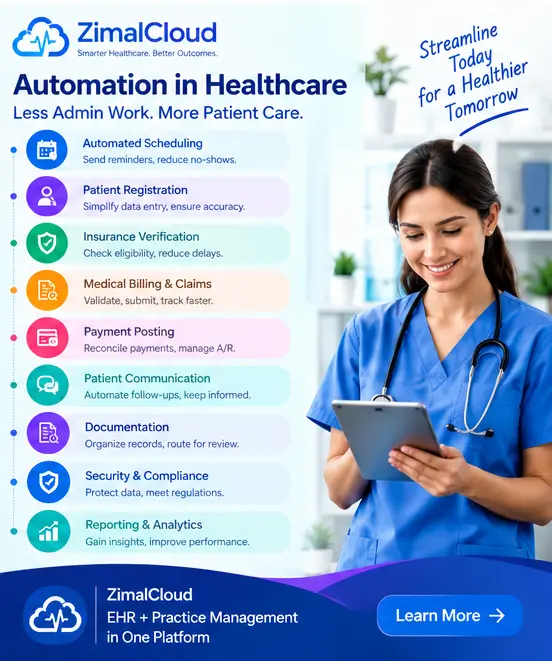
Depending on the system, automation may support administrative activities such as:
- Appointment scheduling and reminders
- Patient registration and data entry
- Insurance eligibility verification
- Medical billing and claims processing
- Payment posting and claim tracking
- Patient communication and follow-ups
- Electronic documentation workflows
- Task assignments and notifications
- Reporting and administrative monitoring
Automation does not eliminate the need for healthcare professionals. Instead, it helps teams manage routine tasks more efficiently while keeping people involved in decisions that require clinical judgment, oversight, or personal interaction.
Why Is Administrative Work a Challenge in Healthcare?
Administrative processes are essential to running a medical practice, but disconnected systems and manual workflows can make them unnecessarily complicated.
Common challenges include:
Repetitive data entry: Staff may need to enter the same patient or insurance information into multiple systems.
Scheduling difficulties: Appointment changes, cancellations, and reminders require ongoing attention.
Insurance verification delays: Missing or outdated coverage information can create problems before services are delivered.
Billing and claims errors: Incomplete information, coding issues, and submission mistakes can delay reimbursement.
Documentation workload: Maintaining accurate patient records and administrative notes takes time.
Communication gaps: Staff may struggle to track pending tasks, follow-ups, and requests across different departments.
Limited operational visibility: Without centralized reporting, managers may find it difficult to identify bottlenecks and monitor performance.
Healthcare automation can help address these challenges by creating more consistent, connected workflows.
8 Ways Automation Can Reduce Administrative Work in Healthcare
1. Automate Appointment Scheduling and Reminders
Appointment management involves coordinating provider availability, patient preferences, cancellations, and rescheduling.
Automated scheduling tools can help practices:
- Send appointment confirmations
- Deliver reminders through supported communication channels
- Notify patients about schedule changes
- Support online booking
- Track cancellations and no-shows
- Reduce repetitive telephone follow-ups
For example, an automated reminder can notify a patient about an upcoming appointment without requiring a staff member to make every call manually.
Staff can then focus on appointments that require personal assistance.
2. Simplify Patient Registration and Data Entry
Patient registration requires accurate demographic, contact, and insurance information.
Automation can simplify the process through digital registration forms, data validation, reusable patient records, and integrations between connected systems.
Potential benefits include:
- Less duplicate data entry
- More consistent patient information
- Faster administrative processing
- Fewer avoidable transcription errors
- Easier access to updated records
Practices should still maintain appropriate identity checks, data validation, and staff review to ensure information remains accurate.
3. Streamline Insurance Eligibility Verification
Insurance verification is an important step in reducing avoidable billing problems.
When supported by payer connections, automated eligibility tools can check coverage information, retrieve available benefit details, and flag records that require additional attention.
These tools may help staff:
- Verify eligibility before appointments
- Identify missing insurance information
- Flag inactive or uncertain coverage
- Record verification results
- Prioritize cases requiring manual review
Automated verification does not guarantee claim approval or payment. Coverage, authorization, medical necessity, and other payer requirements may still need separate review.
However, identifying potential problems earlier can help practices resolve them before they disrupt the billing process.
4. Improve Medical Billing and Claims Processing
Medical billing involves several interconnected tasks, from reviewing patient and encounter information to submitting claims and tracking their status.
Automation can support workflows such as:
- Checking claims for missing information
- Identifying potential coding inconsistencies
- Preparing claims for submission
- Sending claims electronically
- Tracking claim status
- Flagging rejected claims
- Organizing correction and resubmission tasks
For example, a claim validation workflow may flag a missing field before submission, allowing staff to correct the issue earlier.
Human review remains important, especially for complex coding decisions, unusual claims, and compliance-sensitive situations.
5. Reduce Payment Posting and Accounts Receivable Work
After a payer processes a claim, the practice must record payments, adjustments, and remaining balances.
Automation can help import supported electronic remittance advice (ERA), match payment information to accounts, identify discrepancies, and organize outstanding balances for follow-up.
Useful capabilities include:
- Electronic payment posting
- Payment reconciliation
- Outstanding claim tracking
- Accounts receivable aging reports
- Denial identification
- Follow-up task assignment
- Alerts for unresolved balances
These workflows can help billing teams spend less time searching for account information and more time resolving payment issues.
6. Streamline Documentation and Administrative Tasks
Healthcare staff manage various records, forms, care plans, and administrative notes.
Automation can help organize templates, route documents for review, notify users about missing information, and track pending signatures or approvals.
Examples include:
- Document routing
- Automated task reminders
- Standardized templates
- Missing-field notifications
- Review and approval workflows
- Centralized document organization
Automation should support accurate documentation rather than create unverified clinical content. Clinical records must reflect the actual services delivered and should be reviewed by the appropriate professionals.
7. Improve Patient Communication and Follow-Ups
Timely communication is important for appointment attendance, care coordination, and administrative continuity.
Depending on the system and patient preferences, automated communication tools can help deliver:
- Appointment reminders
- Follow-up notifications
- Requests for updated information
- Care-plan review reminders
- Administrative instructions
- Messages about pending forms
Practices should use secure, appropriate communication channels and respect patient consent, privacy, and communication preferences.
Automated messages are useful for routine communication, but sensitive questions and complex patient concerns should be directed to qualified staff.
8. Automate Reporting and Workflow Monitoring
Healthcare administrators need reliable information to understand how their practices operate.
Automated dashboards and reports can collect available operational data and present useful information about:
- Appointment volume
- Claim submission status
- Denial trends
- Payment posting
- Outstanding balances
- Pending tasks
- Staff workload
- Workflow completion
Instead of manually compiling every report, managers can use centralized reporting to identify delays and determine where improvements may be needed.
The quality of these insights depends on accurate source data, appropriate system configuration, and regular review.
How Healthcare Automation Improves Staff Productivity
Automation can improve productivity by reducing repetitive tasks and making workflows more predictable.
For example, consider a practice where staff manually send reminders, check insurance eligibility, locate claim statuses, and compile reports.
When appropriate automation is introduced, the workflow may change from repeatedly performing each task to reviewing exceptions, resolving complex cases, and monitoring results.
This can help teams:
- Reduce avoidable administrative effort
- Improve task prioritization
- Minimize duplicate work
- Respond to issues earlier
- Maintain more consistent workflows
- Allocate staff time more effectively
The actual improvement depends on the practice's current processes, the quality of the software, staff adoption, and the tasks being automated.
Manual Workflows vs. Automated Workflows
| Administrative Task | Manual Approach | Automated Approach |
|---|---|---|
| Appointment reminders | Staff contact patients individually | Software sends scheduled reminders |
| Patient registration | Repeated manual data entry | Digital forms and connected records |
| Eligibility checks | Staff perform individual checks | Supported automated verification |
| Claims processing | Manual review and tracking | Validation rules and status tracking |
| Payment posting | Staff enter payment details manually | Supported ERA import and posting |
| Follow-up management | Staff maintain separate task lists | Centralized tasks and reminders |
| Reporting | Staff compile information manually | Configured dashboards and reports |
Automation does not remove every manual step. Its purpose is to reduce unnecessary work while preserving appropriate human oversight.
The Role of Integrated Healthcare Software
Automation is often more effective when systems can exchange information.
Many practices use separate platforms for electronic health records (EHR), practice management, medical billing, patient communication, and care-management programs.
When these systems are disconnected, staff may need to enter the same information repeatedly or move between different applications to complete a single task.
An integrated healthcare platform can connect workflows such as:
Patient Registration → Scheduling → Encounter → Eligibility → Claim Submission → Payment Posting → Reporting
This connected approach can help reduce information gaps and improve visibility across administrative processes.
For example, ZimalCloud brings EHR and practice-management capabilities together with additional healthcare workflows, helping practices organize clinical and administrative activities through a connected technology environment.
The appropriate integration capabilities depend on the specific products, configuration, and supported interfaces.
How to Implement Healthcare Automation Successfully
Automation works best when it addresses real operational problems instead of adding unnecessary technology.
Step 1: Identify Repetitive Tasks
Review the activities that consume the most staff time. Examples may include appointment reminders, eligibility checks, claims tracking, and report preparation.
Step 2: Map Your Existing Workflow
Understand how information moves between staff, departments, and software systems. Identify duplicate work, delays, and frequent errors.
Step 3: Prioritize High-Value Opportunities
Start with a manageable workflow that has clear goals, such as reducing manual reminders or improving claims tracking.
Step 4: Evaluate Software and Integration
Choose tools that fit your practice's needs, integrate appropriately with existing systems, and provide suitable security and access controls.
Step 5: Train Your Team
Explain how the new workflow operates, when manual review is required, and how staff should handle exceptions.
Step 6: Monitor Performance
Measure results using indicators such as administrative time per task, claim rejection rates, appointment no-shows, outstanding balances, and workflow completion time.
Step 7: Improve Gradually
Use staff feedback and performance data to adjust processes before expanding automation to additional areas.
Security and Compliance Considerations
Healthcare automation must be implemented responsibly because administrative systems may process sensitive patient information.
Before adopting an automation solution, evaluate:
- Role-based access controls
- Appropriate authentication
- Encryption and data protection
- Audit logs
- Backup and recovery procedures
- Secure integrations
- Vendor security practices
- Applicable privacy and regulatory requirements
- Human review and exception handling
Practices subject to HIPAA should assess the relevant HIPAA requirements and applicable business associate obligations. Other organizations must evaluate the privacy and security rules that apply in their jurisdictions.
Automation should never bypass required consent, documentation, billing rules, or professional oversight.
How to Measure the Value of Healthcare Automation
To understand whether automation is helping, establish a baseline before implementation and compare results over time.
Useful performance indicators include:
Administrative time: How long does each task take before and after automation?
Claim rejection rate: Are fewer claims being rejected because of preventable errors?
Appointment no-show rate: Are reminders helping patients attend scheduled appointments?
Payment posting time: How quickly are payments recorded and reconciled?
Accounts receivable: Are outstanding claims and balances being resolved more efficiently?
Staff workload: Are employees spending less time on repetitive tasks?
Total cost: Do the operational benefits justify software, implementation, training, and maintenance expenses?
Use actual practice data rather than assuming that every automated process will produce the same results.
Final Thoughts
Administrative work is essential to healthcare, but repetitive manual processes do not need to consume more time than necessary.
Healthcare automation can help simplify appointment management, patient registration, insurance verification, medical billing, claims processing, payment posting, documentation, communication, and reporting.
The greatest benefits often come from combining well-designed workflows, connected systems, reliable data, and appropriate human oversight.
For medical practices, the goal is not to automate everything. It is to identify the right tasks, reduce unnecessary complexity, and help staff work more efficiently.
Ready to simplify healthcare administration? Explore how ZimalCloud can help connect EHR and practice-management workflows, reduce administrative complexity, and support more efficient practice operations.