How Healthcare APIs Connect EHR and Practice Management Systems
Healthcare APIs help EHR and practice management systems exchange information across clinical, administrative, and billing workflows. Learn how APIs support patient data exchange, scheduling, insurance, documentation, billing, and reporting while reducing duplicate work. Explore FHIR, integration layers, security considerations, data mapping, and best practices for connected healthcare workflows.
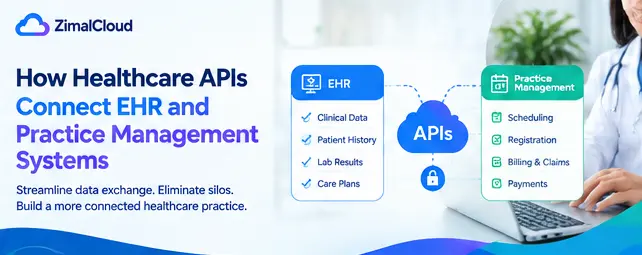
Table of contents
- Introduction
- What Is a Healthcare API?
- What Are EHR and Practice Management Systems?
- EHR System
- Practice Management System
- Why Connect EHR and Practice Management Systems?
- A Simplified Workflow
- How Healthcare APIs Connect EHR and PM Systems
- 1. Data Request
- 2. Authentication
- 3. Data Exchange
- 4. Data Validation
- 5. Workflow Processing
- Common Data Exchanged Between EHR and PM Systems
- Patient Demographics
- Appointment Information
- Insurance Information
- Clinical Information
- Billing and Financial Data
- Healthcare API Standards: FHIR and Beyond
- Benefits of EHR and Practice Management Integration
- 1. Less Duplicate Data Entry
- 2. More Consistent Information
- 3. Improved Workflow Efficiency
- 4. Better Visibility
- 5. Fewer Manual Handoffs
- 6. More Connected Revenue-Cycle Operations
- Example: From Patient Registration to Billing
- Step 1: Patient Registration
- Step 2: Information Exchange
- Step 3: Clinical Encounter
- Step 4: Charge Information
- Step 5: Billing and Claims
- Step 6: Reporting
- Challenges of Healthcare API Integration
- Different Data Structures
- Data Mapping
- Security and Privacy
- Error Handling
- Best Practices for Healthcare API Integration
- Define the Business Workflow First
- Use Appropriate Standards
- Establish Clear Data Ownership
- Build Strong Security Controls
- Monitor Integration Performance
- Test Before Production
- The Role of an Integration Layer
- How APIs Support a More Connected Healthcare Practice
- Conclusion
Introduction
Modern medical practices rely on multiple technology systems to manage patient care and daily operations. An Electronic Health Record (EHR) may store clinical information, while a Practice Management (PM) system handles scheduling, registration, billing, claims, payments, and other administrative processes.
When these systems operate separately, staff may need to enter or transfer information manually. This can create duplicate work, increase the risk of inconsistent information, and make it harder for teams to maintain a connected workflow.
Healthcare APIs can help bridge these systems.
Application Programming Interfaces (APIs) allow different software applications to communicate with each other and exchange information according to defined rules. When properly designed and implemented, healthcare APIs can connect EHR and practice management systems and support more efficient clinical and administrative workflows.
What Is a Healthcare API?
An API is a set of rules and methods that allows one software application to communicate with another.
In healthcare, an API can enable systems to:
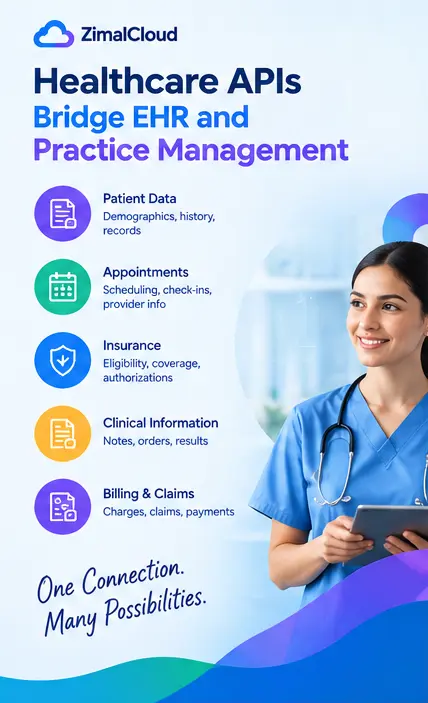
- Request patient information
- Exchange appointment information
- Send demographic data
- Retrieve clinical information
- Exchange insurance information
- Share billing-related data
- Update records between connected applications
- Trigger workflow actions
Instead of requiring staff to move information manually between systems, an API can allow software to exchange appropriate data automatically.
What Are EHR and Practice Management Systems?
Before understanding how APIs connect them, it helps to understand the role of each system.
EHR System
An EHR primarily supports clinical and patient-care activities. Depending on the platform, it may contain:
- Patient demographics
- Medical history
- Diagnoses
- Medications
- Allergies
- Clinical notes
- Orders
- Results
- Care plans
- Provider documentation
Practice Management System
A practice management system generally supports administrative and revenue-cycle operations, including:
- Patient registration
- Appointment scheduling
- Insurance information
- Eligibility workflows
- Charge capture
- Claims
- Payment posting
- Patient balances
- Billing workflows
- Practice reporting
The exact capabilities vary by platform.
Why Connect EHR and Practice Management Systems?
When clinical and administrative systems are disconnected, the same information may need to be entered multiple times.
For example, a patient's demographic information may exist in both systems. If information changes in one application but not the other, staff may have to identify and correct the discrepancy manually.
An API-based integration can help establish a more connected flow of information.
A Simplified Workflow
Patient Registration → EHR/PM Data Exchange → Clinical & Administrative Workflows → Billing/Claims → Reporting
The goal is not simply to move data from one application to another. The goal is to make relevant information available to the right workflow at the right time.
How Healthcare APIs Connect EHR and PM Systems
A typical API integration involves several components.
1. Data Request
One system sends a request to another system through an API.
For example, a practice management system may request specific patient information from an EHR.
2. Authentication
The receiving system verifies that the requesting application is authorized to access the requested information.
Authentication and authorization mechanisms should be designed according to the integration's security requirements.
3. Data Exchange
The systems exchange information using an agreed-upon format and API structure.
Common healthcare interoperability approaches include FHIR and other healthcare data exchange standards.
4. Data Validation
The receiving application validates the information before processing it.
Validation can help identify issues such as:
- Missing required fields
- Invalid formats
- Incorrect identifiers
- Unsupported values
- Duplicate records
5. Workflow Processing
Once the information is accepted, the receiving system can use it within an appropriate workflow.
For example, updated patient information may become available to scheduling, billing, or clinical workflows.
Common Data Exchanged Between EHR and PM Systems
The exact data exchanged depends on the systems and integration requirements.
Patient Demographics
Information such as:
- Name
- Date of birth
- Contact information
- Address
- Patient identifiers
can help maintain consistent patient records.
Appointment Information
APIs can support the exchange of:
- Appointment dates
- Appointment times
- Providers
- Appointment types
- Locations
- Appointment status
This can help clinical and administrative teams work from more consistent scheduling information.
Insurance Information
Depending on the integration, systems may exchange relevant insurance and coverage information to support administrative and billing workflows.
Clinical Information
Where appropriate and authorized, APIs may allow relevant clinical information to move between connected applications.
Billing and Financial Data
Integration can also connect clinical documentation and administrative workflows with information used for:
- Charges
- Claims
- Payments
- Patient balances
- Revenue-cycle processes
The exact workflow depends on the capabilities of the connected platforms.
Healthcare API Standards: FHIR and Beyond
Healthcare interoperability requires more than simply connecting two applications. Systems need agreed-upon methods for representing and exchanging information.
FHIR (Fast Healthcare Interoperability Resources) is a widely used standard for representing and exchanging healthcare information through modern web-based approaches.
FHIR organizes healthcare information into resources that can represent concepts such as patients, practitioners, observations, appointments, and other clinical or administrative data.
Other standards and technologies may also be relevant depending on the integration, organization, and systems involved.
The right approach depends on the systems being connected and the specific business and clinical requirements.
Benefits of EHR and Practice Management Integration
1. Less Duplicate Data Entry
Connected systems can reduce the need for staff to repeatedly enter the same information into multiple applications.
2. More Consistent Information
When appropriate data is synchronized between systems, teams can work with more consistent patient and administrative information.
3. Improved Workflow Efficiency
Automated data exchange can reduce manual steps and allow staff to focus on tasks that require human review and decision-making.
4. Better Visibility
Integration can help authorized users access relevant information without switching between disconnected workflows as frequently.
5. Fewer Manual Handoffs
APIs can connect processes that would otherwise depend on spreadsheets, manual exports, or repeated data entry.
6. More Connected Revenue-Cycle Operations
Connecting clinical and administrative workflows can help practices move information more efficiently from documentation through charge capture, claims, and other revenue-cycle processes.
Example: From Patient Registration to Billing
Consider a simplified patient journey.
Step 1: Patient Registration
A patient is registered in the practice management system.
Step 2: Information Exchange
Relevant demographic and administrative information is exchanged with the EHR through an API.
Step 3: Clinical Encounter
The provider documents the patient's encounter in the EHR.
Step 4: Charge Information
Relevant information can be made available to downstream administrative or billing workflows, depending on the integration.
Step 5: Billing and Claims
The practice management or billing system processes the appropriate information for its revenue-cycle workflow.
Step 6: Reporting
Connected data can support operational and financial reporting.
This type of workflow can reduce unnecessary manual movement of information between systems.
Challenges of Healthcare API Integration
Although APIs can provide significant benefits, healthcare integration can be complex.
Different Data Structures
Two systems may represent the same information differently.
For example, one system may use a specific code or field structure that does not directly match another system.
Data Mapping
Integration teams often need to map fields and values between applications.
For example:
EHR Field → Integration Layer → PM Field
Incorrect mapping can result in incomplete or inaccurate information.
Security and Privacy
Healthcare integrations handle sensitive information, so security must be considered throughout the integration lifecycle.
Important considerations can include:
- Authentication
- Authorization
- Encryption
- Access controls
- Audit logging
- Data minimization
- Secure API credentials
- Monitoring
Organizations should also consider applicable privacy, security, and regulatory requirements.
Error Handling
APIs can fail because of network problems, invalid data, authentication issues, service outages, or other technical conditions.
A reliable integration should have appropriate error handling, logging, monitoring, and recovery processes.
Best Practices for Healthcare API Integration
Define the Business Workflow First
Before developing an integration, identify what problem the connection needs to solve.
Ask:
- What data needs to move?
- Which system is the source of truth?
- When should data be exchanged?
- Who needs access?
- What happens when information is missing?
- What happens when an API request fails?
Use Appropriate Standards
Where supported and appropriate, standardized approaches such as FHIR can help create more structured interoperability.
Establish Clear Data Ownership
Teams should understand which system owns particular information and which system is responsible for updating it.
Build Strong Security Controls
Use appropriate authentication, authorization, encryption, access controls, and monitoring based on the organization's requirements.
Monitor Integration Performance
Healthcare integrations should be monitored for:
- Failed transactions
- Delayed messages
- Data mismatches
- Authentication failures
- Unexpected API responses
Monitoring helps teams identify problems before they significantly affect workflows.
Test Before Production
Testing should cover normal transactions as well as unusual and failure scenarios.
Testing may include:
- Valid data
- Missing data
- Duplicate records
- Invalid values
- API downtime
- Authentication failures
- Partial transactions
The Role of an Integration Layer
Some organizations use an integration platform or middleware between the EHR and practice management system.
Instead of:
EHR ↔ PM System
the architecture may look like:
EHR ↔ Integration Layer ↔ PM System
An integration layer can provide functions such as:
- Data transformation
- Field mapping
- Authentication management
- Routing
- Validation
- Error handling
- Logging
- Monitoring
This approach can be particularly useful when a practice needs to connect multiple healthcare applications.
How APIs Support a More Connected Healthcare Practice
A modern practice may use an EHR, practice management system, billing platform, patient engagement solution, laboratory system, imaging platform, remote monitoring platform, or other specialized applications.
Without integration, each application can become another information silo.
APIs can provide the technical foundation for connecting these systems.
A connected architecture can help practices build workflows around the movement of information rather than individual applications.
Conclusion
Healthcare APIs can play an important role in connecting EHR and practice management systems. By enabling controlled data exchange, APIs can help reduce duplicate data entry, improve information consistency, streamline workflows, and connect clinical and administrative operations.
Successful integration requires more than simply connecting two systems. Healthcare organizations should consider data mapping, interoperability standards, authentication, security, error handling, monitoring, testing, and clear ownership of information.
For practices looking to modernize their technology environment, well-designed API integrations can provide a foundation for more connected and efficient healthcare workflows.