CCM Software for Medical Practices: Features to Look for in 2026
Choosing the right CCM software can help medical practices streamline chronic care management, improve documentation, coordinate patient follow-ups, and support billing workflows. Discover the essential features to look for in 2026, including care plan management, time tracking, EHR integration, automation, reporting, security, and scalability to make an informed software decision for practice.
Table of contents
- Introduction
- What Is CCM Software?
- Why Medical Practices Need CCM Software in 2026
- 1. Reduce Manual Administrative Work
- 2. Improve Care Coordination
- 3. Support Consistent Documentation
- 4. Improve Operational Visibility
- 5. Support Program Growth
- Essential CCM Software Features to Look for in 2026
- 1. Patient Eligibility Management
- 2. Individualized Care Plan Management
- 3. Time Tracking and Activity Documentation
- 4. EHR Integration and Data Synchronization
- 5. Patient Communication and Follow-Up
- 6. Task Management and Workflow Automation
- 7. Billing Workflow Support
- 8. Reporting and Performance Dashboards
- 9. Security, Privacy, and Access Controls
- 10. User-Friendly Interface and Staff Training
- 11. Scalability and Customization
- 12. Transparent Pricing and Return on Investment
- How ZimalCloud Can Support Connected Care Workflows
- Conclusion
Introduction
Managing patients with chronic conditions requires ongoing communication, organized care plans, accurate documentation, and consistent follow-up. For medical practices, these responsibilities can become challenging when staff members rely on disconnected systems, manual processes, or spreadsheets to coordinate care.
Chronic Care Management (CCM) software helps healthcare providers organize non-face-to-face care activities for eligible patients with multiple chronic conditions. The right software can support care coordination, streamline documentation, improve workflow visibility, and help practices manage CCM program operations more efficiently.
However, not all CCM software solutions offer the same capabilities. Some focus primarily on patient engagement, while others provide broader tools for care planning, time tracking, billing workflows, and reporting.
In 2026, medical practices should evaluate CCM software based on how well it fits their clinical workflows, supports applicable billing requirements, protects patient information, and integrates with existing healthcare systems.
This guide explores the essential CCM software features medical practices should consider before selecting a solution.
What Is CCM Software?
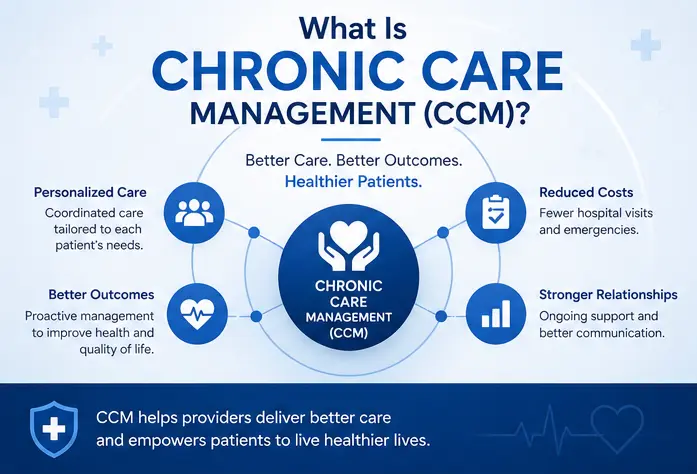
CCM software is a digital solution that helps medical practices coordinate and document ongoing care for eligible patients with chronic conditions. It supports activities such as care plan management, patient communication, care team coordination, time tracking, and reporting.
Depending on the platform, CCM software may also connect with electronic health records (EHRs), practice management systems, remote patient monitoring (RPM) tools, and revenue cycle management workflows.
The goal is to help healthcare teams manage ongoing patient care in a structured, consistent, and measurable way.
Why Medical Practices Need CCM Software in 2026
As healthcare organizations continue adopting digital workflows, practices need reliable ways to manage recurring care activities without creating unnecessary administrative work.
CCM software can help address several common operational challenges.
1. Reduce Manual Administrative Work
Manually tracking patient calls, care plan updates, and monthly care activities can consume valuable staff time. Software can centralize these tasks and reduce repetitive data entry when appropriate automation is available.
2. Improve Care Coordination
CCM often involves physicians, nurses, care coordinators, and administrative staff. A shared workflow helps team members understand patient needs, assigned responsibilities, and outstanding follow-up tasks.
3. Support Consistent Documentation
Accurate documentation is essential for communicating care activities and supporting applicable billing requirements. CCM software can help teams maintain organized records of care plans, patient interactions, time, and other required information.
4. Improve Operational Visibility
Practice managers need to understand which patients require attention, which activities remain incomplete, and where workflow delays occur. Reporting tools and dashboards can make this information easier to review.
5. Support Program Growth
As a CCM program expands, spreadsheets and disconnected tools can become difficult to manage. A scalable software solution can help practices organize larger patient populations while maintaining consistent workflows.
Essential CCM Software Features to Look for in 2026
Before choosing a platform, medical practices should identify the features that address their current challenges and future operational needs.
1. Patient Eligibility Management
Identifying patients who may qualify for CCM is an important first step in building an effective program.
Look for software that helps practices:
- Identify patients with relevant chronic conditions.
- Organize patient records and eligibility information.
- Track eligibility reviews and enrollment status.
- Record patient consent where required.
- Flag records that need staff review or follow-up.
Eligibility-related alerts can help teams prioritize reviews, but software should not automatically determine billing eligibility without the appropriate clinical and administrative checks.
2. Individualized Care Plan Management
A structured care plan helps the care team coordinate ongoing support around each patient's needs and goals.
Useful features include:
- Digital care plan creation and updates.
- Patient-specific health goals and interventions.
- Medication and care coordination information.
- Assignment of responsibilities to team members.
- Documentation of care plan reviews.
- Easy access to relevant plan information.
The software should support individualized care planning rather than relying entirely on generic templates. It should also make care plan updates accessible to authorized members of the care team.
3. Time Tracking and Activity Documentation
Time tracking is a key consideration for practices that bill for time-based CCM services.
Look for tools that help staff record qualifying activities, associate time with the appropriate patient and service period, and review accumulated time.
Important capabilities include:
- Activity-level time entries.
- Date, staff member, and activity descriptions.
- Patient-specific time summaries.
- Review of applicable monthly thresholds.
- Identification of incomplete or duplicate entries.
- Audit trails and correction histories.
Practices should verify that the software supports current payer and CPT requirements. Automated timers and summaries can assist staff, but they do not replace accurate records or ensure that every recorded activity qualifies for billing.
4. EHR Integration and Data Synchronization
Using separate systems for patient demographics, clinical records, care management, and billing can create duplicate work and inconsistent information.
CCM software with appropriate EHR integration can help authorized users access relevant patient information without repeatedly entering the same data.
Evaluate whether the platform supports:
- Patient demographic synchronization.
- Access to relevant diagnoses and clinical information.
- Care plan data exchange.
- Documentation sharing.
- Integration with practice management and billing systems.
- Reliable error handling and synchronization monitoring.
Ask vendors how integrations work, which systems are supported, and whether information flows in both directions. Integration quality is often more important than the number of systems listed on a vendor's website.
5. Patient Communication and Follow-Up
Consistent communication is central to ongoing chronic care management.
CCM software should make it easier for care teams to coordinate outreach and track whether patients need additional support.
Potential features include:
- Call and communication logs.
- Follow-up task scheduling.
- Reminders for pending activities.
- Documentation of patient concerns.
- Communication preferences.
- Escalation of issues requiring clinical attention.
If automated messages are available, practices should confirm that consent, privacy, communication preferences, and applicable legal requirements are properly addressed.
6. Task Management and Workflow Automation
A strong CCM platform should help staff understand what needs to happen next, who is responsible, and when a task is due.
Useful workflow features include:
- Automated task creation based on defined rules.
- Follow-up reminders.
- Assignment of tasks to appropriate team members.
- Alerts for overdue activities.
- Status tracking for enrollment, care plans, and documentation.
- Configurable workflows for different practice needs.
Automation should reduce repetitive administrative work without bypassing clinical review or required approvals.
7. Billing Workflow Support
CCM billing involves more than generating a claim. Practices need a reliable process for reviewing documentation, confirming applicable requirements, and communicating information to their billing teams.
Look for software that supports:
- Review of documented time and qualifying activities.
- Checks for missing information.
- Identification of potential duplicate or conflicting services.
- Documentation review before claim submission.
- Export or integration of relevant billing information.
- Tracking of claim status where supported.
Confirm that the platform accommodates applicable Medicare and payer rules, including patient eligibility, consent, care plan requirements, service-specific time thresholds, and restrictions on overlapping services where relevant.
Software alerts can reduce preventable errors, but they should not be treated as a guarantee of reimbursement or compliance.
8. Reporting and Performance Dashboards
Reports help practice leaders evaluate program performance and identify workflow bottlenecks.
Useful reporting capabilities include:
- CCM enrollment and participation.
- Care plan completion and review status.
- Recorded care activities and time.
- Pending follow-ups and overdue tasks.
- Documentation completeness.
- Billing workflow status.
- Staff workload and operational trends.
Ideally, dashboards should allow authorized users to filter information by provider, care team, patient status, and reporting period.
Practices should also check whether reports can be exported for internal reviews and whether the underlying data is clearly defined.
9. Security, Privacy, and Access Controls
CCM software handles sensitive patient information, making security a fundamental requirement.
Before purchasing a solution, evaluate whether it offers:
- Role-based access controls.
- Secure authentication.
- Encryption appropriate to the data and environment.
- Audit logs for relevant user activity.
- Backup and recovery procedures.
- Appropriate data retention and deletion controls.
- Business associate agreement support when required.
- Documented security incident response procedures.
Practices subject to HIPAA should assess the vendor's role, contractual obligations, safeguards, and overall compliance responsibilities. A vendor's security claims alone do not establish that a practice is compliant.
10. User-Friendly Interface and Staff Training
Even feature-rich software can create problems if staff members find it difficult to use.
An intuitive interface can help teams complete daily tasks more consistently and reduce the learning curve.
During a demonstration, evaluate whether users can easily:
- Find a patient record.
- Review and update a care plan.
- Record a patient interaction.
- Enter and review time.
- Assign and complete tasks.
- Identify missing documentation.
- Access reports.
Ask vendors about onboarding, training resources, customer support, and the process for resolving technical issues.
11. Scalability and Customization
A solution that works for a small practice may not meet the needs of a larger organization with multiple providers or locations.
Consider software that can accommodate changing patient volumes, team structures, and reporting requirements.
Ask whether the platform supports configurable workflows, multiple locations, different user roles, and additional care programs if your practice plans to expand.
Customization should make the software fit your operations without creating unnecessary complexity.
12. Transparent Pricing and Return on Investment
Software cost should be evaluated alongside the operational value it provides.
Compare vendors based on:
- Per-provider, per-user, or per-patient pricing.
- Implementation and onboarding fees.
- Integration costs.
- Training and support charges.
- Contract terms and cancellation policies.
- Included features versus paid add-ons.
Consider whether the platform can reduce duplicate data entry, improve documentation consistency, and help staff manage follow-up more efficiently.
Rather than evaluating a solution solely by its monthly price, assess its total cost of ownership and measurable impact on practice operations.
How ZimalCloud Can Support Connected Care Workflows
Medical practices benefit when care management, documentation, and operational processes work together rather than operating as isolated activities.
ZimalCloud supports a connected healthcare workflow approach designed to help practices coordinate care-related processes and reduce administrative friction. Depending on the selected solution and configuration, practices can evaluate how connected workflows may support care program operations, documentation, and revenue cycle activities.
When assessing ZimalCloud or any CCM software provider, practices should review the available features, integration options, implementation requirements, and service terms to determine whether the solution matches their specific needs.
The goal is to give healthcare teams a more organized way to manage operational tasks while keeping patient care and appropriate clinical oversight at the center of the process.
Conclusion
The best CCM software for medical practices in 2026 is not necessarily the platform with the most features. It is the solution that fits your workflow, supports accurate documentation, simplifies care coordination, integrates with your existing systems, and provides appropriate security and reporting capabilities.
Prioritize patient eligibility management, individualized care plans, time tracking, EHR integration, communication tools, workflow automation, billing support, and clear performance reporting. Then evaluate usability, vendor support, scalability, and total cost.
A careful selection process can help your practice build more consistent CCM workflows, reduce avoidable administrative work, and support ongoing care for eligible patients with chronic conditions.
Ready to improve your practice's care management workflows? Explore how connected healthcare technology from ZimalCloud may support your operational goals, and request a demo to discuss your practice's requirements.