How Remote Patient Monitoring Works
Remote Patient Monitoring (RPM) connects patients, medical devices, and healthcare teams beyond the traditional clinic. Learn how RPM works—from patient enrollment and device setup to data collection, transmission, clinical review, alerts, documentation, and follow-up—and how connected RPM workflows can help practices improve monitoring, reduce manual work, and support ongoing patient care.
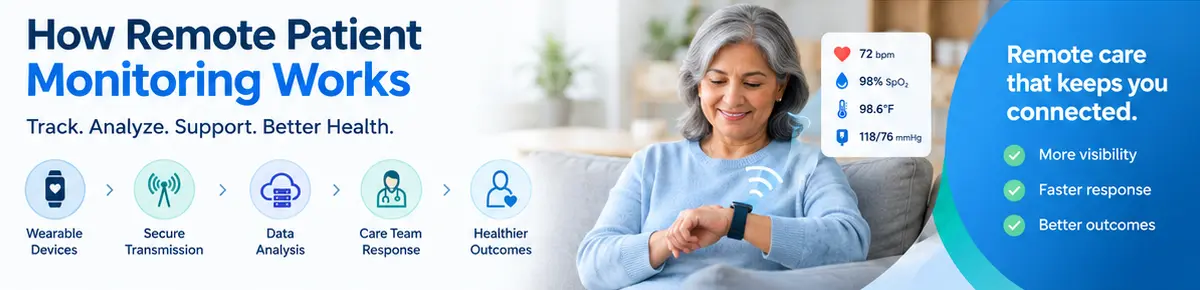
Table of contents
- Introduction
- What Is Remote Patient Monitoring?
- RPM Is More Than a Device
- How Does Remote Patient Monitoring Work?
- 1. Patient Identification and Eligibility
- 2. Patient Enrollment and Consent
- 3. Device Selection and Setup
- Device Setup May Include:
- 4. Patient Takes Measurements at Home
- 5. Data Is Transmitted to the Practice
- 6. Data Is Organized in the RPM Platform
- 7. Clinical Review of Patient Data
- 8. Alerts and Exceptions
- 9. Patient Communication and Follow-Up
- 10. Documentation
- 11. Ongoing Monitoring
- A Simple Remote Patient Monitoring Workflow
- What Types of Devices Are Used in RPM?
- Blood Pressure Monitors
- Glucose Monitoring Devices
- Pulse Oximeters
- Connected Weight Scales
- Other Connected Devices
- What Is an RPM Dashboard?
- Why Is Data Integration Important in RPM?
- Common RPM Workflow Challenges
- Device Management
- Patient Engagement
- Alert Management
- Data Overload
- Documentation
- How Automation Can Improve RPM Workflow
- Automated Device Assignment
- Automated Data Collection
- Automated Alerts
- Patient Worklists
- Monitoring Dashboards
- Documentation Support
- RPM and the Healthcare Practice
- RPM and Revenue Cycle Workflow
- How to Choose an RPM Platform
- 1. Does it support the devices we need?
- 2. Does it provide a clear clinical dashboard?
- 3. Does it support alerts?
- 4. Does it support device management?
- 5. Does it integrate with the patient record?
- 6. Does it support documentation?
- 7. Does it support billing workflows?
- 8. Is the platform secure?
- Benefits of a Well-Designed RPM Workflow
- RPM vs. Traditional In-Office Monitoring
- Traditional Model
- RPM Model
- The Future of Remote Patient Monitoring
- Conclusion
Introduction
Remote Patient Monitoring (RPM) has changed how healthcare practices can monitor patients outside the traditional clinical setting.
Instead of relying only on information collected during office visits, RPM allows eligible patients to use connected medical devices to collect health data at home. That information can then be transmitted to a healthcare practice for review, documentation, and appropriate clinical follow-up.
A typical RPM workflow connects:
Patient Enrollment → Consent → Device Setup → Data Collection → Data Transmission → Clinical Review → Alerts & Follow-Up → Documentation → Ongoing Monitoring
For doctors, practice owners, and practice managers, understanding this workflow is important because successful RPM is not simply about providing patients with devices. It requires a structured process for enrollment, monitoring, clinical review, documentation, and ongoing patient engagement.
This guide explains how Remote Patient Monitoring works and how healthcare practices can build an organized RPM workflow.
What Is Remote Patient Monitoring?
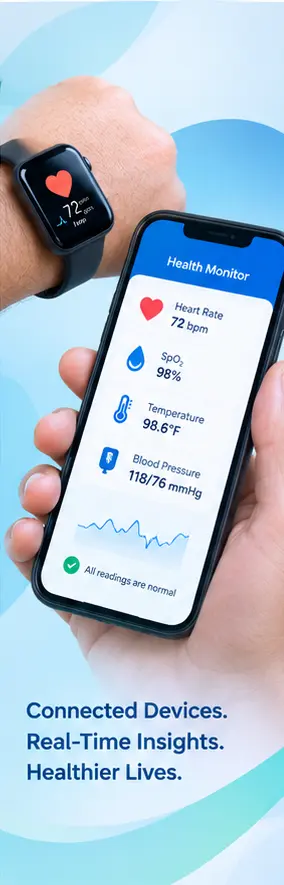
Remote Patient Monitoring is a healthcare process that uses connected medical devices to collect patient health information outside a traditional healthcare facility.
Depending on the patient's condition and monitoring plan, devices may collect measurements such as:
- Blood pressure
- Blood glucose
- Weight
- Pulse rate
- Oxygen saturation
- Other appropriate health measurements
The collected information can be transmitted electronically to a healthcare practice or monitoring platform.
Healthcare professionals can then review the available data and determine whether follow-up or other clinical action is appropriate.
RPM Is More Than a Device
A common misconception is that RPM simply means giving a patient a connected medical device.
In reality, an effective RPM program involves several components:
Patient + Device + Connectivity + Data + Clinical Review + Documentation + Follow-Up
Without a structured workflow, device data alone may not provide meaningful value to the practice or patient.
How Does Remote Patient Monitoring Work?
The basic RPM process can be divided into several stages.
1. Patient Identification and Eligibility
The first step is identifying patients who may be appropriate for remote monitoring.
The healthcare team may consider factors such as:
- The patient's medical condition
- Need for ongoing monitoring
- Ability to use the required technology
- Clinical goals
- Provider assessment
- Practice workflow
- Applicable payer requirements
The provider and care team should determine whether RPM is appropriate for the individual patient.
A structured workflow can help practices identify potential candidates without turning patient selection into a completely manual process.
2. Patient Enrollment and Consent
Once a patient is identified as appropriate for RPM, the practice begins the enrollment process.
This may include:
- Explaining the RPM program
- Discussing how monitoring works
- Obtaining required consent
- Recording enrollment information
- Identifying the appropriate device
- Establishing monitoring instructions
Patients should understand what information is being collected, how the technology works, and how the healthcare team will use the information.
Clear communication at this stage can improve patient participation and reduce confusion later.
3. Device Selection and Setup
The next step is providing the patient with an appropriate connected monitoring device.
Depending on the patient's monitoring needs, this may include a:
- Connected blood pressure monitor
- Glucose monitoring device
- Pulse oximeter
- Connected weight scale
- Other appropriate remote monitoring equipment
The device must be configured correctly and the patient should understand how to use it.
Device Setup May Include:
Device Assignment → Patient Instructions → Pairing/Activation → Connectivity Check → First Reading
A well-designed RPM platform can help practices maintain visibility into device assignment and status.
4. Patient Takes Measurements at Home
After setup, the patient uses the device according to the monitoring plan.
For example, a patient may be instructed to measure blood pressure at appropriate intervals.
The device collects the measurement and, when supported, transmits the information electronically.
Instead of requiring the patient to manually report every measurement, connected devices can help automate the transfer of health data.
5. Data Is Transmitted to the Practice
The collected information moves from the patient's device to the RPM technology platform.
A simplified data flow looks like:
Patient → Connected Device → Transmission → RPM Platform → Healthcare Team
Depending on the technology, connectivity may involve Bluetooth, cellular connectivity, Wi-Fi, mobile applications, or other supported methods.
The goal is to make relevant health information available to authorized members of the care team.
6. Data Is Organized in the RPM Platform
Raw measurements are more useful when they are presented in a structured way.
An RPM platform may organize information by:
- Patient
- Device
- Measurement type
- Date and time
- Trends
- Thresholds
- Alerts
- Monitoring status
Instead of reviewing scattered readings, healthcare staff can use a centralized dashboard to understand which patients require attention.
7. Clinical Review of Patient Data
Clinical review is a critical part of the RPM workflow.
The care team reviews the information according to the patient's monitoring plan and applicable practice procedures.
The review may consider:
- Recent measurements
- Trends over time
- Significant changes
- Patient-reported information
- Previous readings
- Symptoms or concerns
- Other relevant clinical information
RPM should not be viewed as simply collecting data.
The value comes from collecting relevant information and incorporating appropriate clinical review and follow-up into patient care.
8. Alerts and Exceptions
RPM platforms can help identify measurements or situations that may require attention.
For example, a system may flag measurements that fall outside configured parameters.
A simplified workflow could be:
Measurement Received → Rule Evaluated → Alert Generated → Care Team Review → Appropriate Action
However, an alert should not automatically be treated as a diagnosis or emergency.
Clinical staff need to interpret the information in the appropriate context and follow the practice's escalation procedures.
9. Patient Communication and Follow-Up
When appropriate, the healthcare team may communicate with the patient.
Depending on the situation, follow-up may involve:
- Reviewing measurements
- Discussing symptoms
- Providing education
- Reinforcing monitoring instructions
- Adjusting the monitoring plan when clinically appropriate
- Scheduling an appointment
- Escalating concerns according to established protocols
Patient communication helps turn monitoring data into an ongoing care process.
10. Documentation
RPM activities should be appropriately documented in the patient's healthcare record and relevant RPM workflow.
Documentation may include information such as:
- Monitoring activity
- Patient interactions
- Clinical review
- Relevant measurements
- Care-team actions
- Follow-up
- Other required information
A connected RPM platform can help reduce the need to move information manually between separate systems.
11. Ongoing Monitoring
RPM is generally an ongoing workflow rather than a one-time event.
The cycle continues:
Monitor → Receive Data → Review → Respond → Document → Continue Monitoring
The care team can continue monitoring the patient according to the established care plan and clinical needs.
This ongoing workflow is particularly relevant for patients who need regular observation between traditional office visits.
A Simple Remote Patient Monitoring Workflow
The complete RPM workflow can be visualized as:
1. Identify Patient
↓
2. Assess Appropriateness
↓
3. Enroll & Obtain Required Consent
↓
4. Assign Connected Device
↓
5. Educate Patient
↓
6. Collect Measurements
↓
7. Transmit Data
↓
8. Monitor Dashboard
↓
9. Clinical Review
↓
10. Address Alerts & Follow Up
↓
11. Document Activities
↓
12. Continue Monitoring
A structured workflow helps make sure that patient data does not simply enter the system and remain untouched.
What Types of Devices Are Used in RPM?
Different RPM programs use different devices depending on the patient's monitoring needs.
Blood Pressure Monitors
Connected blood pressure monitors can transmit blood pressure and pulse measurements for remote review.
Glucose Monitoring Devices
For appropriate patients, connected glucose monitoring technology can provide relevant glucose measurements to the healthcare team.
Pulse Oximeters
Pulse oximeters can provide measurements such as oxygen saturation and pulse rate when clinically appropriate.
Connected Weight Scales
Weight monitoring can be useful in certain clinical situations where changes in weight are relevant to ongoing patient management.
Other Connected Devices
RPM technology continues to evolve, with additional connected devices and integrations supporting different types of monitoring.
The appropriate device should be selected based on the patient's needs, clinical goals, technology capabilities, and applicable requirements.
What Is an RPM Dashboard?
An RPM dashboard gives the care team a centralized view of monitoring activity.
A useful dashboard may display:
- Active RPM patients
- Device status
- Recent readings
- Measurement trends
- Alerts
- Patients requiring review
- Monitoring activity
- Documentation status
Instead of opening individual systems for every patient, a centralized dashboard can help staff prioritize workflow.
Why Is Data Integration Important in RPM?
One of the biggest challenges in healthcare technology is disconnected information.
An RPM platform may collect valuable patient data, but that information becomes harder to use when it is isolated from the patient's broader healthcare record.
A connected workflow can help bring together:
Patient Record + RPM Data + Clinical Review + Care Management + Practice Management
For example, the same patient may participate in RPM while also receiving other services or care programs.
Having relevant information available within a connected patient record can help reduce duplicate data entry and improve workflow visibility.
Common RPM Workflow Challenges
Implementing RPM can introduce operational challenges if the workflow is not carefully designed.
Device Management
Practices need to know:
- Which device is assigned to each patient
- Whether the device is active
- Whether data is being received
- Whether technical assistance is required
Patient Engagement
Patients may forget to use their devices or may have difficulty understanding the technology.
A structured outreach process can help identify patients who need assistance.
Alert Management
Too many alerts can create unnecessary workload.
Practices need clear protocols for reviewing and responding to alerts.
Data Overload
RPM can generate significant amounts of information.
The system should help clinicians focus on meaningful trends and information rather than simply presenting large volumes of raw data.
Documentation
Monitoring activity and clinical review need to be documented appropriately.
A workflow that requires staff to manually transfer information between systems can increase administrative burden.
How Automation Can Improve RPM Workflow
Automation can support many repetitive parts of an RPM program.
Examples include:
Automated Device Assignment
Track which devices are associated with which patients.
Automated Data Collection
Connected devices can transmit measurements without requiring manual entry for each reading.
Automated Alerts
The system can flag measurements based on configured rules for appropriate staff review.
Patient Worklists
Care teams can see patients who may require monitoring, outreach, or review.
Monitoring Dashboards
Staff can monitor RPM activity from a centralized interface.
Documentation Support
Structured workflows can help staff record relevant monitoring and review activities.
The objective is not to remove healthcare professionals from the process.
The objective is to reduce repetitive work so healthcare professionals can focus on patient care and appropriate clinical decisions.
RPM and the Healthcare Practice
For practice owners and managers, RPM should be treated as an operational workflow—not simply another technology product.
A successful program may require coordination between:
- Providers
- Nurses
- Care managers
- Administrative staff
- Billing teams
- Patients
- Technology vendors
Each participant has a different responsibility.
A clearly defined workflow helps establish who handles:
Enrollment → Device Setup → Monitoring → Alerts → Clinical Review → Documentation → Billing
RPM and Revenue Cycle Workflow
For practices implementing reimbursable RPM services, clinical workflow and revenue-cycle workflow need to work together.
A simplified process is:
Patient Enrollment
↓
Device & Monitoring Activity
↓
Clinical Review
↓
Documentation
↓
Coding & Billing Review
↓
Claim Submission
↓
Payment Processing
Specific billing requirements, codes, documentation requirements, patient eligibility rules, and payer policies can change and should be verified against current applicable requirements.
Technology should support the workflow rather than encourage practices to provide services solely for billing purposes.
How to Choose an RPM Platform
When evaluating an RPM platform, healthcare practices should consider more than device connectivity.
Important questions include:
1. Does it support the devices we need?
Verify compatibility with the devices used by your patient population.
2. Does it provide a clear clinical dashboard?
Staff should be able to identify patients and measurements requiring review.
3. Does it support alerts?
Understand how alerts are configured, routed, prioritized, and documented.
4. Does it support device management?
The practice should have visibility into device assignment and status.
5. Does it integrate with the patient record?
Integration can help reduce duplicate documentation and disconnected workflows.
6. Does it support documentation?
Look for structured tools that fit the practice's actual workflow.
7. Does it support billing workflows?
Understand how monitoring activity can move into the appropriate billing process while maintaining required review and controls.
8. Is the platform secure?
Healthcare organizations should evaluate appropriate privacy, security, access-control, and compliance capabilities before adopting an RPM solution.
Benefits of a Well-Designed RPM Workflow
A structured RPM program can help healthcare practices:
- Monitor appropriate patients outside the office
- Improve visibility into patient measurements
- Identify changes that may require clinical attention
- Reduce manual data entry
- Organize care-team workflows
- Improve documentation consistency
- Connect monitoring with broader patient care
- Create a more scalable operational process
For patients, remote monitoring can provide a convenient way to share relevant health information without requiring every measurement to happen during an office visit.
RPM vs. Traditional In-Office Monitoring
Traditional care often depends heavily on measurements collected during scheduled visits.
RPM extends monitoring beyond those visits by allowing appropriate patients to collect measurements from home.
Traditional Model
Patient → Office Visit → Measurement → Provider Review
RPM Model
Patient → Home Measurement → Connected Device → RPM Platform → Clinical Review → Follow-Up
RPM does not replace traditional medical care.
Instead, it can complement office-based care when remote monitoring is clinically appropriate.
The Future of Remote Patient Monitoring
Remote Patient Monitoring is becoming increasingly connected with broader healthcare technology ecosystems.
Future RPM workflows may increasingly connect:
Connected Devices + EHR + AI-Assisted Workflows + Care Management + Patient Engagement + Practice Management
Artificial intelligence may assist with organizing large volumes of information, identifying patterns, prioritizing worklists, and reducing repetitive administrative tasks.
However, clinical decisions remain the responsibility of appropriately qualified healthcare professionals.
The long-term opportunity is not simply collecting more patient data.
It is creating a workflow in which the right information reaches the right healthcare professional at the right time.
Conclusion
Remote Patient Monitoring is a complete healthcare workflow—not simply a connected medical device.
The process can include:
Patient Identification → Enrollment → Consent → Device Setup → Data Collection → Transmission → Clinical Review → Alerts → Follow-Up → Documentation → Ongoing Monitoring
For medical practices, the success of RPM depends on how effectively these steps work together.
A well-designed RPM platform can help practices organize patient enrollment, manage devices, receive health data, prioritize clinical review, document activity, and connect monitoring with the broader patient record.
The goal is simple:
Collect meaningful patient data, create an organized clinical workflow, and make remote monitoring easier for both patients and healthcare teams.
FAQ
Frequently asked questions
What is Remote Patient Monitoring (RPM)?
Remote Patient Monitoring (RPM) is a healthcare process that uses connected medical devices to collect health information from patients outside a traditional healthcare facility. The data can be transmitted to a healthcare practice for appropriate clinical review, documentation, and follow-up.
How does Remote Patient Monitoring work?
Remote Patient Monitoring typically involves identifying an appropriate patient, enrollment and consent, device setup, collection of health measurements, electronic data transmission, clinical review, alerts or follow-up when appropriate, documentation, and ongoing monitoring.
What devices are used for Remote Patient Monitoring?
RPM programs may use connected devices such as blood pressure monitors, glucose monitoring devices, pulse oximeters, connected weight scales, and other appropriate medical monitoring devices depending on the patient's clinical needs.
What happens after an RPM device collects patient data?
When supported by the device and technology, collected measurements are transmitted to an RPM platform. The information can then be organized for review by authorized members of the healthcare team.
What is an RPM dashboard?
An RPM dashboard is a centralized interface that can display patient monitoring information such as recent measurements, trends, device status, alerts, and patients requiring review. It can help healthcare teams organize remote monitoring activities.
How are RPM alerts handled?
RPM platforms can flag measurements based on configured parameters. Appropriate members of the healthcare team can review the information, interpret it in the patient's clinical context, and follow established procedures for communication, follow-up, or escalation.
Does Remote Patient Monitoring replace in-office care?
No. Remote Patient Monitoring does not replace traditional medical care. It can complement office-based care by allowing appropriate patients to share relevant health information between scheduled visits.
How does RPM benefit healthcare practices?
A structured RPM workflow can help practices monitor appropriate patients outside the office, organize patient data, reduce manual data entry, support clinical review, improve documentation workflows, and connect remote monitoring with broader patient care.
How does RPM benefit patients?
RPM can allow appropriate patients to collect certain health measurements from home and share relevant information with their healthcare team without requiring every measurement to be collected during an office visit.
Why is device management important in RPM?
Device management helps practices track which device is assigned to each patient, whether the device is active, whether data is being received, and whether technical assistance may be required.
How can automation improve an RPM workflow?
Automation can support repetitive RPM activities such as device assignment, data collection, alert generation, patient worklists, monitoring dashboards, and structured documentation. Automation should support healthcare professionals while maintaining appropriate clinical oversight.
Can RPM data be integrated with an EHR or patient record?
RPM technology can be designed to integrate relevant monitoring information with an EHR or broader patient record. Integration can help reduce duplicate data entry and connect remote monitoring with other clinical and care-management workflows.
What should practices consider when choosing an RPM platform?
Practices should evaluate device compatibility, data connectivity, clinical dashboards, alert management, device tracking, patient workflows, documentation capabilities, EHR integration, security, privacy, and support for applicable billing and operational requirements.
Is Remote Patient Monitoring the same as telehealth?
Remote Patient Monitoring and telehealth are related but different healthcare technologies. RPM focuses on collecting and monitoring patient health data remotely, while telehealth generally involves delivering healthcare services through telecommunications technology, such as virtual visits.