The Complete Medical Practice Workflow: From Patient Registration to Payment
A medical practice involves more than patient visits. From registration and scheduling to clinical documentation, coding, claims, payment, and follow-up, every step affects efficiency and revenue. Learn how a connected medical practice workflow can reduce repetitive work, improve data flow, streamline billing, and help doctors and practice managers run operations more effectively.
Table of contents
- Introduction
- What Is a Medical Practice Workflow?
- The Complete Medical Practice Workflow
- 1. Patient Registration
- Why Registration Matters
- 2. Appointment Scheduling
- Example
- 3. Appointment Confirmation and Reminders
- 4. Patient Check-In
- A Better Check-In Workflow
- 5. Clinical Encounter
- 6. Clinical Documentation
- The Problem With Manual Documentation
- 7. Diagnosis and Procedure Coding
- 8. Charge Capture
- 9. Claim Preparation
- 10. Electronic Claim Submission
- 11. Claim Rejections and Denials
- Denial Management Workflow
- 12. Payment Processing
- 13. Patient Billing
- 14. Payment Collection
- 15. Follow-Up and Ongoing Care
- How All Parts of the Workflow Connect
- Common Medical Practice Workflow Problems
- 1. Duplicate Data Entry
- 2. Disconnected Software
- 3. Manual Billing Processes
- 4. Poor Visibility
- 5. Communication Gaps
- How Automation Can Improve Medical Practice Workflow
- Automated Patient Registration
- Automated Appointment Reminders
- Automated Documentation Assistance
- Coding Assistance
- Automated Claim Workflows
- Revenue Cycle Tracking
- Why One Connected Platform Can Matter
- Key Benefits of an Efficient Medical Practice Workflow
- Greater Operational Efficiency
- Better Data Accuracy
- Faster Billing
- Better Revenue Visibility
- Improved Staff Productivity
- Better Provider Experience
- Improved Patient Experience
- What Should Practice Managers Measure?
- How to Build a Better Medical Practice Workflow
- Step 1: Map the Current Workflow
- Step 2: Identify Bottlenecks
- Step 3: Standardize Processes
- Step 4: Automate Repetitive Tasks
- Step 5: Connect Systems
- Step 6: Maintain Human Oversight
- Step 7: Measure Results
- The Future of Medical Practice Workflow
- Conclusion
Introduction
A medical practice involves much more than seeing patients.
Every day, staff members manage patient registration, appointments, insurance information, check-in, clinical documentation, coding, billing, claims, payments, and follow-up. When these activities operate in disconnected systems or rely heavily on manual work, small inefficiencies can quickly become costly problems.
A well-designed medical practice workflow connects administrative, clinical, and financial processes into a coordinated system.
From the moment a patient registers to the moment the practice receives payment, every step should move information forward without unnecessary duplication.
This guide explains the complete medical practice workflow and shows how technology and automation can help practices improve efficiency, reduce administrative burden, and create a smoother experience for both staff and patients.
What Is a Medical Practice Workflow?
A medical practice workflow is the sequence of administrative, clinical, and financial activities that take place during a patient's interaction with a healthcare practice.
A typical workflow includes:
Patient Registration → Appointment Scheduling → Check-In → Clinical Encounter → Documentation → Coding → Claim Submission → Payment Posting → Follow-Up
Although this appears straightforward, each stage can involve multiple people, systems, and processes.
For example, patient information collected during registration may later be needed for:
- Scheduling
- Insurance verification
- Clinical documentation
- Coding
- Billing
- Claims
- Payment processing
- Patient communication
When information is entered repeatedly, the risk of errors increases.
A connected workflow allows information to move from one stage to the next with less manual intervention.
The Complete Medical Practice Workflow
1. Patient Registration
The workflow begins when a patient contacts or registers with the practice.
Registration may include collecting:
- Patient name
- Date of birth
- Contact information
- Address
- Insurance information
- Emergency contact
- Primary care information
- Medical history
- Consent forms
- Communication preferences
Why Registration Matters
Accurate registration is important because incorrect demographic or insurance information can create problems later.
For example, an incorrect insurance ID may result in:
- Claim rejection
- Delayed reimbursement
- Additional staff work
- Patient billing issues
A digital registration workflow can help practices collect information once and make it available to authorized staff throughout the patient's journey.
2. Appointment Scheduling
After registration, the patient may schedule an appointment.
Scheduling involves more than selecting a date and time.
The practice may need to determine:
- Provider availability
- Appointment type
- Visit duration
- Location
- New vs. established patient
- Required preparation
- Insurance requirements
- Procedure requirements
For specialty practices, scheduling may also depend on the type of service being performed.
Example
A GI practice may need to coordinate:
Referral → Consultation → Procedure Scheduling → Preparation → Procedure → Follow-Up
A connected scheduling workflow helps prevent unnecessary back-and-forth between staff and patients.
3. Appointment Confirmation and Reminders
Missed appointments can negatively affect practice productivity.
Automated reminders can help patients remember upcoming visits through appropriate communication channels.
A reminder workflow may include:
Appointment Created → Confirmation → Reminder → Patient Response → Appointment Updated
Depending on the practice, reminders may communicate:
- Appointment date
- Appointment time
- Provider
- Location
- Preparation instructions
- Cancellation or rescheduling information
Automation allows staff to spend less time making repetitive reminder calls.
4. Patient Check-In
When the patient arrives, the next stage is check-in.
Front-desk staff may verify:
- Patient identity
- Demographic information
- Insurance
- Consent forms
- Appointment details
- Outstanding information
A digital check-in process can reduce paperwork and help staff identify missing information before the patient reaches the clinical workflow.
A Better Check-In Workflow
Patient Arrival → Identity Verification → Insurance Verification → Forms → Copayment → Ready for Provider
This creates a smoother transition from administrative work to clinical care.
5. Clinical Encounter
Once check-in is complete, the patient moves into the clinical workflow.
The provider may review:
- Chief complaint
- Medical history
- Medications
- Allergies
- Previous records
- Test results
- Current symptoms
- Treatment history
The provider then performs the appropriate examination, assessment, and treatment.
This stage generates clinical information that eventually becomes part of the billing process.
6. Clinical Documentation
Documentation is one of the most important components of the medical practice workflow.
The provider needs to accurately document the encounter, including relevant:
- Findings
- Assessment
- Diagnosis
- Treatment
- Orders
- Procedures
- Follow-up instructions
Good documentation supports continuity of care and helps establish the information needed for accurate coding and billing.
The Problem With Manual Documentation
When information is duplicated across multiple systems, providers and staff may spend unnecessary time entering the same information repeatedly.
A connected EHR and practice management workflow can reduce duplicate data entry and improve information consistency.
7. Diagnosis and Procedure Coding
After the clinical encounter, diagnoses and procedures need to be translated into appropriate billing codes.
Common coding activities include:
- Diagnosis coding
- Procedure coding
- Evaluation and management coding
- Modifier selection
- Documentation review
- Coding validation
Accurate coding is important because coding errors can contribute to:
- Claim denials
- Payment delays
- Underbilling
- Overbilling
- Compliance concerns
Technology can assist coding workflows by presenting relevant information to authorized users for review.
However, automation should support qualified professionals rather than replace appropriate clinical and coding judgment.
8. Charge Capture
Charge capture connects the clinical encounter to the financial workflow.
The practice identifies services performed during the visit and ensures that appropriate charges are recorded.
A typical process is:
Encounter → Documentation → Diagnosis/Procedure → Charge Capture → Claim Preparation
Missing charges can result in lost revenue.
For this reason, practices should have a reliable process for identifying services performed and ensuring they are appropriately captured.
9. Claim Preparation
Once charges and coding are ready, the claim can be prepared.
A claim generally contains information such as:
- Patient demographics
- Insurance information
- Provider information
- Diagnosis codes
- Procedure codes
- Modifiers
- Charges
- Dates of service
Before submission, practices should perform appropriate validation checks.
The objective is simple:
Submit a clean and accurate claim the first time whenever possible.
10. Electronic Claim Submission
Claims are typically transmitted electronically through the appropriate billing infrastructure.
The workflow may look like:
Practice System → Clearinghouse → Payer → Claim Processing
Electronic submission can be significantly more efficient than manual paper-based processes.
A connected system can also help staff monitor claim status and identify issues that require attention.
11. Claim Rejections and Denials
Not every claim will be paid successfully on the first submission.
Claims may be rejected or denied because of issues such as:
- Incorrect patient information
- Eligibility problems
- Missing information
- Coding errors
- Authorization issues
- Duplicate claims
- Incorrect payer information
A strong revenue-cycle workflow should include a process for identifying and resolving these issues.
Denial Management Workflow
Denial Identified → Reason Reviewed → Correction Made → Claim Resubmitted → Status Monitored
Without a structured denial workflow, unpaid claims can remain unresolved and negatively affect cash flow.
12. Payment Processing
Once the payer processes a claim, the practice receives payment information.
Payments may come through electronic remittance or other appropriate payment channels.
The financial workflow includes:
- Payment receipt
- Remittance processing
- Payment posting
- Adjustment posting
- Patient responsibility
- Outstanding balance tracking
Accurate payment posting is essential for understanding the practice's actual financial position.
13. Patient Billing
After insurance processing, the patient may have a remaining balance.
The practice may need to communicate:
- Amount due
- Insurance payment
- Adjustments
- Patient responsibility
- Payment options
A clear patient billing process can reduce confusion and improve the overall financial experience.
14. Payment Collection
The final financial stage is collecting outstanding patient balances.
Practices may provide multiple payment options depending on their systems and policies.
A well-organized workflow can track:
Balance Created → Statement Sent → Payment Received → Balance Updated
Automation can reduce repetitive administrative work associated with payment reminders and account follow-up.
15. Follow-Up and Ongoing Care
The workflow does not necessarily end when payment is received.
Healthcare is often an ongoing process.
Patients may require:
- Follow-up appointments
- Care management
- Remote monitoring
- Additional procedures
- Referrals
- Medication management
- Preventive care
- Chronic care services
A connected patient record allows practices to continue managing the patient after the original encounter.
How All Parts of the Workflow Connect
The strongest medical practice workflows connect administrative, clinical, and financial activities.
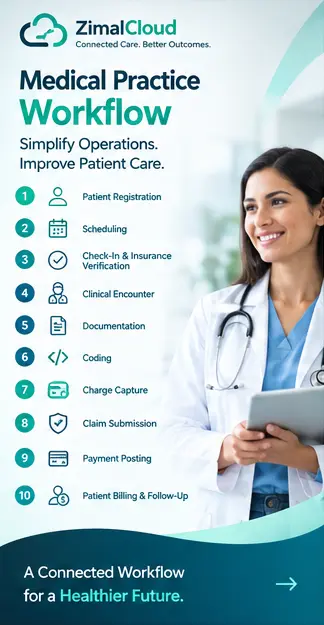
A simplified model looks like this:
Patient Registration
↓
Appointment Scheduling
↓
Check-In & Insurance Verification
↓
Clinical Encounter
↓
Documentation
↓
Diagnosis & Procedure Coding
↓
Charge Capture
↓
Claim Submission
↓
Payer Processing
↓
Payment Posting
↓
Patient Balance
↓
Payment Collection
↓
Follow-Up Care
Instead of treating every stage as a separate process, practices can build a connected workflow where information moves with the patient.
Common Medical Practice Workflow Problems
Many practices face similar operational challenges.
1. Duplicate Data Entry
Staff may enter the same patient information into multiple systems.
This consumes time and increases the possibility of errors.
2. Disconnected Software
When scheduling, EHR, billing, and care-management systems do not communicate effectively, staff may have to switch between platforms.
3. Manual Billing Processes
Manual charge entry, claim preparation, and payment posting can create unnecessary administrative work.
4. Poor Visibility
Practice managers may struggle to quickly understand:
- Which claims are pending
- Which claims were denied
- Which payments were received
- Which patient balances remain outstanding
5. Communication Gaps
Information can become fragmented when different departments maintain separate records.
How Automation Can Improve Medical Practice Workflow
Automation can help practices reduce repetitive administrative tasks while keeping staff and providers in control.
Examples include:
Automated Patient Registration
Digital forms can collect patient information before or during the visit.
Automated Appointment Reminders
Patients can receive scheduled reminders without requiring staff to manually contact every patient.
Automated Documentation Assistance
Structured templates and intelligent workflows can help providers document encounters more efficiently.
Coding Assistance
Technology can identify potential diagnosis and procedure coding opportunities for professional review.
Automated Claim Workflows
Claims can move through validation and submission processes with fewer manual steps.
Revenue Cycle Tracking
Dashboards can provide visibility into claims, payments, denials, and outstanding balances.
Why One Connected Platform Can Matter
A practice may use several specialized applications, but excessive fragmentation can create operational challenges.
A connected platform can bring together:
- Practice management
- Scheduling
- Patient registration
- EHR
- Billing
- Care management
- RPM
- CCM
- PCM
- BHI
- GI workflows
- Mental health workflows
The advantage is not simply having more features.
The real advantage is connecting workflows around the same patient record.
For example:
Appointment → Encounter → Care Program → Procedure → Coding → Billing → Payment
When these processes share relevant information, staff can spend less time moving data between systems.
Key Benefits of an Efficient Medical Practice Workflow
A well-designed workflow can help practices achieve:
Greater Operational Efficiency
Reduce repetitive administrative tasks and unnecessary manual work.
Better Data Accuracy
Entering information once and reusing it appropriately can reduce duplication.
Faster Billing
A structured process can move information from encounter documentation toward billing more efficiently.
Better Revenue Visibility
Practice managers can monitor claims, payments, denials, and outstanding balances.
Improved Staff Productivity
Automation allows staff to focus more on tasks requiring human judgment and patient interaction.
Better Provider Experience
Providers can spend less time navigating disconnected administrative processes.
Improved Patient Experience
A smoother workflow can reduce unnecessary paperwork, delays, and communication gaps.
What Should Practice Managers Measure?
Improving workflow requires more than implementing software. Practices should measure performance.
Important metrics may include:
- Appointment no-show rate
- Patient wait time
- Registration completion rate
- Documentation turnaround time
- Claim submission time
- Clean claim rate
- Claim denial rate
- Days in accounts receivable
- Payment posting turnaround
- Patient balance collection rate
- Staff productivity
Tracking these metrics helps practices identify where workflow improvements can have the greatest impact.
How to Build a Better Medical Practice Workflow
A practical approach is to start with the patient's journey.
Step 1: Map the Current Workflow
Document what happens from registration through payment.
Step 2: Identify Bottlenecks
Look for repeated data entry, manual handoffs, delays, and disconnected processes.
Step 3: Standardize Processes
Create consistent workflows for common situations.
Step 4: Automate Repetitive Tasks
Automate appropriate administrative and operational activities.
Step 5: Connect Systems
Where possible, reduce unnecessary switching between disconnected applications.
Step 6: Maintain Human Oversight
Automation should support providers and staff, particularly where clinical, coding, or compliance judgment is required.
Step 7: Measure Results
Track workflow and revenue-cycle metrics to determine whether changes are actually improving performance.
The Future of Medical Practice Workflow
The future of healthcare operations is moving toward more connected and intelligent workflows.
Instead of separate systems for every function, practices increasingly need technology that can connect:
Patient Data + Clinical Documentation + Care Programs + Practice Operations + Billing
Artificial intelligence and automation can assist with repetitive tasks, while integrated systems can help information move more efficiently across departments.
The goal is not to automate everything.
The goal is to remove unnecessary administrative friction so providers and staff can focus on delivering and managing care.
Conclusion
The complete medical practice workflow extends far beyond patient registration and scheduling.
It includes every step from:
Registration → Scheduling → Check-In → Clinical Care → Documentation → Coding → Claims → Payment → Follow-Up
When these processes are disconnected, practices can lose time, create unnecessary administrative work, and experience avoidable billing problems.
A connected medical practice workflow can help bring administrative, clinical, care-management, and financial processes together around the patient record.
For doctors, practice owners, and practice managers, the key question is not simply:
"Do we have software for each task?"
The better question is:
"Do our systems work together as one workflow?"
That shift—from individual tools to connected workflows—can be an important step toward a more efficient, scalable, and financially healthy medical practice.
FAQ
Frequently asked questions
What is a medical practice workflow?
A medical practice workflow is the sequence of administrative, clinical, and financial processes that take place during a patient's interaction with a healthcare practice. It can include patient registration, appointment scheduling, check-in, clinical documentation, coding, charge capture, claim submission, payment posting, billing, and follow-up care.
What are the main steps in a medical practice workflow?
The main steps typically include patient registration, appointment scheduling, appointment reminders, check-in and insurance verification, clinical encounters, documentation, diagnosis and procedure coding, charge capture, claim preparation and submission, payment posting, patient billing, payment collection, and follow-up care.
Why is an efficient medical practice workflow important?
An efficient medical practice workflow can reduce repetitive administrative work, improve data accuracy, support faster billing, provide better visibility into claims and payments, improve staff productivity, and create a smoother experience for providers and patients.
How does patient registration affect medical practice operations?
Patient registration establishes important demographic, contact, insurance, consent, and other information used throughout the patient's journey. Accurate registration can help reduce claim errors, billing problems, duplicate data entry, and administrative delays.
How does scheduling fit into the medical practice workflow?
Scheduling connects patients with appropriate providers, services, appointment types, locations, and available time slots. A structured scheduling workflow can also support appointment confirmations, reminders, preparation instructions, cancellations, and rescheduling.
What happens after a patient check-in?
After check-in, the patient typically moves into the clinical workflow. Staff may verify identity, insurance, forms, and appointment information before the provider reviews the patient's history, performs the encounter, documents findings, and creates the appropriate clinical record.
How are clinical documentation and medical billing connected?
Clinical documentation provides important information used to support diagnosis, procedure coding, charge capture, and claim preparation. A connected workflow can help relevant information move from the clinical encounter toward the billing process while maintaining appropriate professional review.
What is charge capture in a medical practice?
Charge capture is the process of identifying services performed during a patient encounter and recording the appropriate charges. It connects clinical services with the financial workflow and helps ensure that billable services are appropriately captured.
What causes medical claim denials?
Medical claims may be denied or rejected for reasons such as incorrect patient or insurance information, eligibility problems, missing information, coding issues, authorization requirements, duplicate claims, or payer-specific requirements.
How can healthcare automation improve medical practice workflows?
Healthcare automation can reduce repetitive administrative tasks such as appointment reminders, data entry, workflow routing, claim processing activities, and payment-related tasks. Automation can help staff work more efficiently while keeping appropriate human oversight for clinical, coding, and compliance decisions.
What are the benefits of a connected medical practice platform?
A connected medical practice platform can help bring scheduling, EHR workflows, clinical documentation, practice management, care programs, billing, and other operational processes together around a shared patient record. This can reduce unnecessary system switching and duplicate data entry.
What metrics should medical practices track to improve workflow?
Practices can track metrics such as appointment no-show rates, patient wait times, registration completion, documentation turnaround time, claim submission time, clean claim rate, denial rate, accounts receivable days, payment posting turnaround, patient balance collection, and staff productivity.